Maya 2022 brings seamless USD integration, improvements to animation, rigging and modelling toolsets and the latest version of Arnold.
USD Plug-in for Maya
Universal Scene Description (USD) support in Maya is now available:
Animation Ghosting
In previous versions of Maya when you wanted to change the way ghosts appeared with multiple meshes selected, each of their attributes had to be edited individually in the Attributes editor.
The new Ghosting editor gives you an interface to apply Ghost attributes individually or as a group.
Component Tags for Deformers
Component Tags let you create node-independent named groups to deform geometry, letting you modify tag membership on the fly.
Using Component Tags replaces the groupID node previously needed to transform vertices, as well as cleans up the Node Editor by eliminating Tweak nodes. Component Tag nodes are automatically created with a subset of components selected whenever you create a deformer.
Create and edit Component Tag membership with the Component Tags table
Python 3
In Windows and Linux, Maya starts in Python 3 by default and available on all platforms
Bifrost 2.2.1.0 plug-in
The new Bifrost plugin has simulation workflow enhancements, e.g. resume simulation from cached frame, spawn new particles and low-resolution Aero refinement.
Graph Editor Improvements
Peak Removal Filter to clean up noisy animation data
Added to the Graph Editor Curves menu, is a new animation filter, the Peak Removal Filter.
Similar to the MotionBuilder filter of the same name, the Peak Removal Filter lets you clean up unwanted spikes and peaks in your animation curves.
Smooth filter (Gaussian) for curve "noise" reduction
Another new MotionBuilder filter, the Smooth filter (Gaussian) has been added to the Graph Editor Curves menu, to let you remove jittering and noise in curve channels. See Smooth filter (Gaussian) options for details.
New Display Option
A new Show Animated Shapes option in the Graph Editor List menu lets you set whether the Graph Editor displays all curves downstream from a node, or just the animation curve of the selected node. This is useful if you have custom rigs with specialized connections or when animators only want to view the transforms for a selected object.
Preserve Tangent Type for Added keys: on (default)
Preserve Tangent Type: Now for Added Keys
The Preserve Tangent Type option, formerly only for Inserted Keys, is now available for Added Keys.
Previously, when you added a key to a curve, by default, the new key respected the tangents on either side of the key. This ensured that added keys did not change the neighbouring tangents type while still changing the shape of the curve. This behaviour continues to be the default setting.
Preserve Tangent Type for Added keys: off
Customise Key Selection
You can now shrink the active selection area of keys in the Graph Editor graph view by using the Min key selection size in the Animation (Settings) preferences.
Sweep Mesh
Meshes can be created from simple curves using the Sweep Mesh feature using various profiles letting you create a wide array organic and hard surface forms like:
Tubes
Pipes
Ribbons
Cables
Ropes
Roads
Horns
Hair Cards
Architectural features (e.g. crownmoulding)
Security Preferences
Flag specific commands or plugin locations to be blocked when Maya loads them in the Preferences window.
Rokoko Motion Library Plug-in
Drag and drop professional mocap assets into your scenes, leveraging on assets built for big productions like Star Wars: The Last Jedi, Doctor Strange, Assassin’s Creed, and Horizon Zero Dawn in your own projects.
Cached Playback Improvements
In previous versions of Maya, you could turn on Caching support for dynamics nodes such as Boss, or Nucleus. Now, Cached Playback for dynamics is on by default and dynamics simulation content caching is shown in a separate pass that appears as a pink status line in the Time Slider just above the Animation Cache Status line.
New Solidify Deformer
The new Solidify deformer lets you create areas of geometry that appear more solid on deformed geometry, which lets you define rigid parts of a character’s clothes, such as buttons or a belt buckle.
It works by analysing deformed sections of geometry and dividing it into separate polygon islands. Each polygon island is then replaced by the original geometry moved and blended into place based on the approximation of the matrix derived from the deformed vertices.
OpenColorIO v2
With an emphasis on visual effects and computer animation, the OpenColor IO v2 colour management system has been integrated into Maya 2022
Start up Experience Improvements
A number of improvements have been made to Maya’s startup experience, including:
Faster start up and quit times
No longer steals focus during start up
Remembering the state of the Output Window
Ability to copy specific preferences from a previous install
A new, more informative splash screen
New Morph Deformer
The new Morph deformer is like a GPU-Accelerated version of the BlendShape deformer.
With a GPU-Accelerated version of the BlendShape deformer, it provides simple AB morphs, partial to whole mesh morphs (or whole mesh to partial), as well as the ability to incorporate legacy CPU deformers in deformation chains without blocking the rest of the chain from GPU evaluation.
It features:
Absolute, Relative, and Surface Space morph modes
Object and World morph spaces
An option that automatically creates a topology Mapping feature for alternate vert table lookup
Neighbour options for stabilizing Relative space morph mode coordinate system
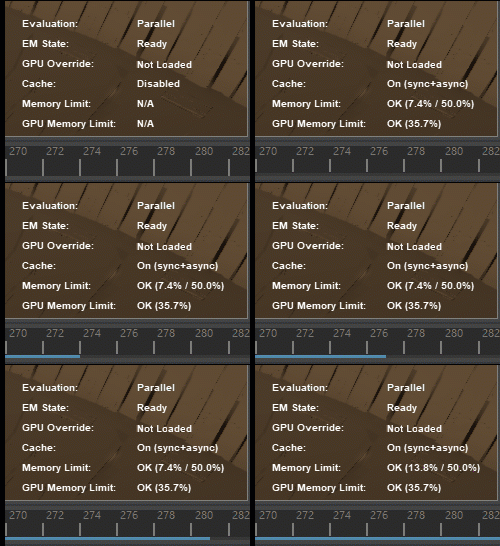
HUD: Updated Evaluation Manager Status Messaging
Changes have been made to the Maya Heads Up Display (HUD) Evaluation Manager status messages to better reflect the condition of the Evaluation Manager (EM).
The previous “Rebuild Required”, then “Ready” (but still requiring partitioning) status messaging was unclear if the EM was performing Parallel evaluation.
The new status messaging is now Rebuild Required, then Built, followed by Ready, states that depict each stage of the Evaluation Graph as it is unbuilt, built, and partitioned.
To display this information on the Viewport, go to Display > Heads Up Display and choose the Evaluation option.
Time Slider Bookmark Improvements
New functionalities have been added to Time Slider Bookmarks:
Interactive Move and Scale
Step through bookmarks
Move frames with bookmarks
Bookmark Manager
Deformer Updates
Falloff applied to a Wave deformer
Deformer Falloff effects
Falloff support for Skin Cluster
HumanIK: Neck Motion Reduction setting
A new Neck Motion Reduction slider has been added that lets you minimize the movement from a character’s body to its neck.
Updated System Requirements
Minimum Linux system requirements for Maya have changed, and new Visual Studio and gcc versions are now supported.
On Windows, Visual Studio has been updated to 2019.7. There are no changes to Windows system requirements.
On Linux, gcc has been updated to 9.3.1. Linux users will require CentOS 7.6 or higher to use this preview release. They will also need to ensure that these additional libraries are installed to run Maya:
libxcb-icccm.so.4 from package xcb-util-wm
libxcb-image.so.0 from package xcb-util-image
libxcb-keysyms.so.1 from package xcb-util-keysyms
libxcb-render-util.so.0 from package xcb-util-renderutil
Create VR for Maya
Create VR for Maya is an immersive conceptual design tool that empowers artists and designers to start their creative process directly in 3D. Using simple curve and surface tools designers can explore form and shape while being fully immersed in virtual reality alongside their design. Sketches and models can then be easily exported to Maya or other content creation applications for final realization.
Arnold for Maya 4.2.1 plug-in
Maya 2022 includes MtoA 4.2.1 which introduces Arnold 6.2.0.1, and is a feature release that brings light mixing, bloom and interactive denoising through imagers, better USD support to improve your experience working with USD in Maya, an improved layout to the Arnold Render View, and OSL syntax highlighting to the OSL shader.
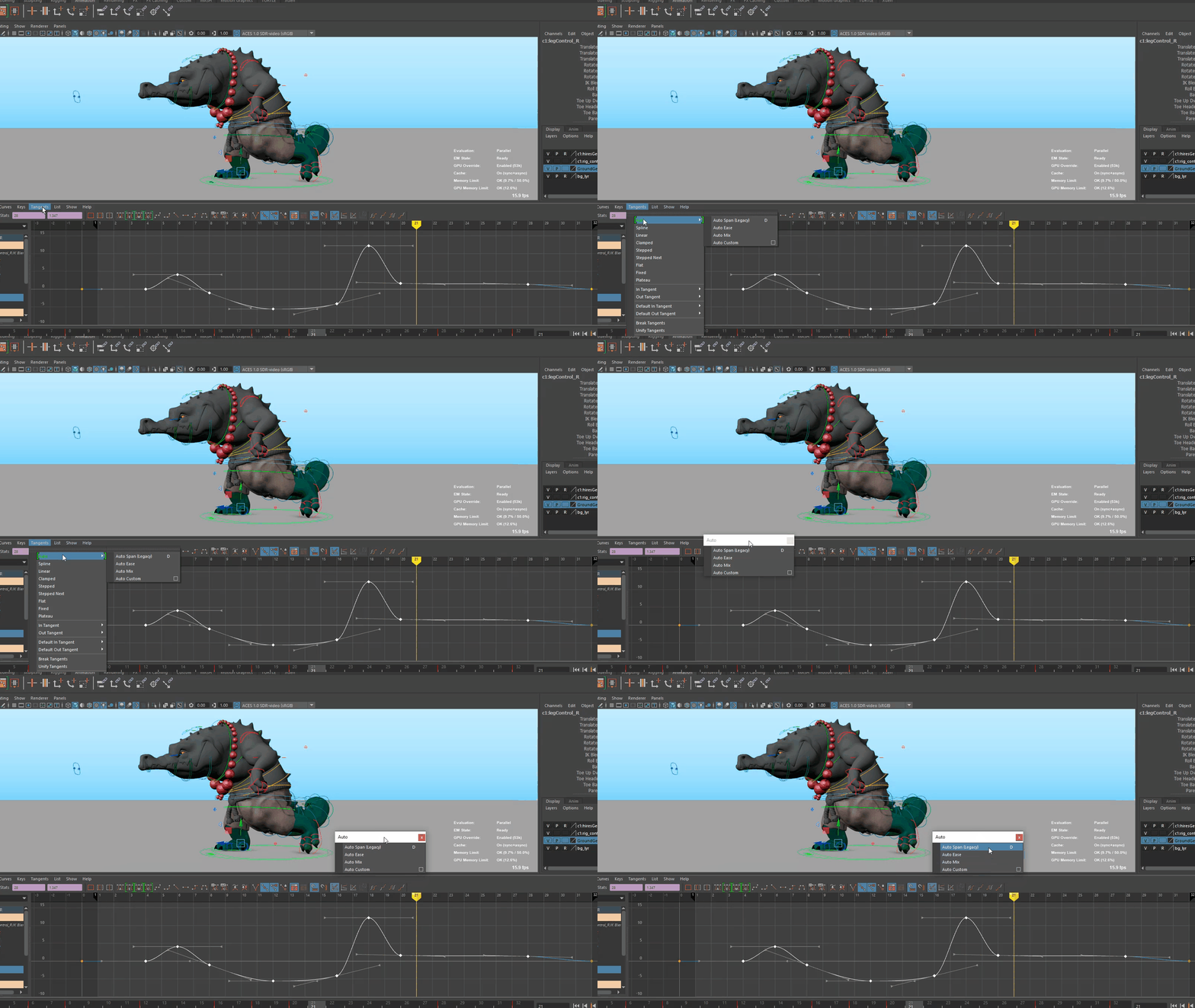
Auto Tangent Types
New options for Auto Tangents in the Graph Editor offer an improved algorithm, giving animators better control and more predictable results.
Contact Us
If you would to discuss Autodesk software, please contact us by calling on 1800 490 514, by filling out the form or clicking the live chat in the bottom right-hand corner.