|
 |
 |
 |
 |
 |
|
| Fast Delivery | Money Back Guarantee | Cards Welcome | Premium Support | Free Onboarding | Autodesk Reseller |
Revit 2024 Commercial New Single-user ELD Annual Subscription
Buy Now and get an extra $400.00 of value for free!
– Free Premium Technical Support valued at $275.00
– Free Onboarding Session valued at $125.00
Revit 2024: Empowering Efficient Architectural Design and Collaboration
Are you looking for a powerful and comprehensive software solution that revolutionizes architectural design and collaboration? Look no further than Revit. With its advanced capabilities and intuitive interface, Revit is the go-to choice for architects, designers, and construction professionals worldwide. In this comprehensive product page, we’ll delve into the features, benefits, and unique aspects of Revit that make it the ultimate tool for streamlining your design processes and delivering outstanding results.
Subscription Benefits
Subscribing comes with several valuable benefits that enhance your experience and productivity. Here are some key subscription benefits you can enjoy with Revit:
- Design Consulting Premium Technical Support: When you subscribe with Design Consulting, you get a 4-hour response time, Monday-Friday, 8am to 8pm on top of your Autodesk technical support benefits.
- Consulting Session: Get a one on one session with one of our Design Consulting experts.
- Access to Latest Software Updates: Stay up-to-date with the latest features, enhancements, and performance improvements as Autodesk releases new versions of Revit. With an active subscription, you can download and install these updates to leverage the most advanced tools and capabilities.
- Flexible Licensing Options: Choose between single-user or multi-user licensing options based on your specific needs. Single-user licenses are ideal for individuals, while multi-user licenses enable collaboration and sharing among multiple team members.
- Cloud Collaboration and Storage: Take advantage of cloud-based collaboration tools that facilitate seamless communication and teamwork. Share Revit models with stakeholders and team members, allowing them to view, comment, and collaborate in real-time. Additionally, benefit from cloud storage options that provide secure access to your files from anywhere, anytime.
- Technical Support and Learning Resources: Gain access to expert technical support from Autodesk’s team of professionals. Whether you have questions about software functionality, encounter issues, or need guidance, the support team is available to assist you. Furthermore, access a vast library of learning resources, including tutorials, webinars, and knowledge base articles, to enhance your Revit skills and optimize your workflows.
- Extended Software Usage Rights: With a subscription, you have the flexibility to install and use Revit on multiple devices, allowing you to work seamlessly across different workstations and locations.
- Autodesk AEC Collection: Depending on your subscription plan, you may have access to the Autodesk AEC Collection, which includes additional powerful software tools for architecture, engineering, and construction. The collection provides a comprehensive suite of industry-leading applications that complement and extend the capabilities of Revit.
- Cost-Efficiency and Predictable Budgeting: Subscriptions offer a cost-effective way to access Revit, eliminating the need for significant upfront investment. With a subscription, you can budget your software expenses more predictably, as the subscription fee covers the software license, updates, and support.
By subscribing, you gain continuous access to the latest software features, technical support, collaboration tools, and learning resources. This empowers you to optimise your design workflows, improve project outcomes, and stay ahead in the evolving field of architectural design and construction.
Building Information Modeling (BIM) at Its Best
Revit is a Building Information Modeling (BIM) software developed by Autodesk. It goes beyond traditional 2D drafting and design, enabling you to create intelligent 3D models that incorporate parametric relationships and data-rich elements. With Revit, you can design, visualise, simulate, and document your architectural projects more efficiently and accurately.
Key Features and Benefits
- Comprehensive Design Tools: Offers a wide range of tools specifically tailored for architectural design. Create walls, roofs, floors, and other building components with ease using intuitive modeling tools. Customise the appearance and behaviour of elements to match your project requirements.
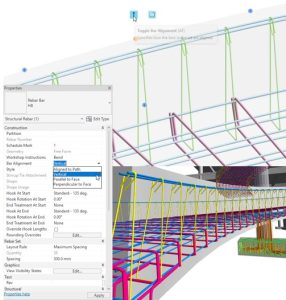
- Intelligent Parametric Modeling: Parametric modeling capabilities allow you to create designs that respond intelligently to changes. Modify a parameter, and it automatically updates all associated elements, ensuring consistency and reducing errors.
- Collaboration and Coordination: With collaboration features, multiple team members can work on a project simultaneously. The software provides real-time coordination, allowing for seamless collaboration, clash detection, and model merging. Improve communication among project stakeholders and avoid costly construction conflicts.
- Building Information Modeling (BIM) Workflows: BIM-centric approach enables architects to develop comprehensive and coordinated models that contain not only geometric data but also vital information about materials, quantities, and schedules. This facilitates accurate cost estimation, energy analysis, and facility management.
- Parametric Families and Libraries: Includes an extensive library of parametric families, including doors, windows, furniture, and fixtures. These pre-built components enable you to quickly populate your designs and enhance the level of detail in your models.
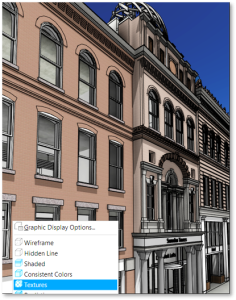
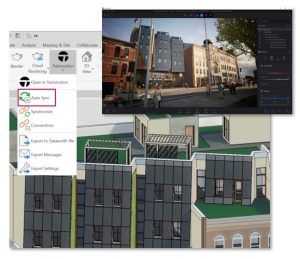
- Rendering and Visualization: Visualise your designs with stunning realism using built-in rendering capabilities or Twin motion add-on. Create photorealistic images and animations to showcase your architectural concepts and designs. Impress clients and stakeholders with immersive visualizations that bring your ideas to life.
- Construction Documentation: Powerful documentation tools simplify the process of creating construction documentation. Generate accurate and detailed 2D drawings, schedules, and specifications directly from the 3D model. Make revisions in one place, and watch as the changes propagate throughout the documentation.
- Interoperability and File Exchange: Supports various file formats, allowing for seamless interoperability with other design and construction software. Import and export files in commonly used formats like DWG, IFC, and DGN, ensuring smooth data exchange and collaboration with external stakeholders.
- Analysis and Simulation: Offers built-in analysis and simulation tools that help architects evaluate the performance of their designs. Conduct energy analysis, lighting analysis, and structural analysis to optimize building efficiency, identify potential issues, and ensure compliance with industry standards.
- Extensions and Add-ons: Extend the capabilities with a wide range of extensions and add-ons available in the Autodesk App Store. These third-party tools can enhance specific workflows, automate tasks, and further streamline your design and documentation processes.
Compare
Revit stands out among other architectural design software due to its robust BIM capabilities and collaborative features. Let’s compare with another popular software, AutoCAD, to understand their key differences:
| Features | Revit | AutoCAD |
|---|---|---|
| 3D Modeling | ✔️ | ✔️ |
| Parametric Design | ✔️ | Partial |
| Building Information Modeling (BIM) | ✔️ | Limited |
| Collaboration Tools | ✔️ | Limited |
| Construction Documentation | ✔️ | ✔️ |
| Rendering and Visualization | ✔️ | ✔️ |
| Interoperability | ✔️ | ✔️ |
| Analysis and Simulation | ✔️ | Limited |
| Extensions and Add-ons | ✔️ | ✔️ |
While both Revit and AutoCAD offer 3D modeling capabilities, Revit’s strong suit lies in its BIM workflows and collaboration tools. AutoCAD is widely used for 2D drafting and design and lacks the comprehensive BIM capabilities..
Revit 2024 vs Revit LT 2024
| Features | Revit | Revit LT |
|---|---|---|
| 3D Modeling | ✔️ | ✔️ |
| Building Information Modeling (BIM) | ✔️ | ✔️ |
| Parametric Design | ✔️ | ✔️ |
| Collaboration Tools | ✔️ | Limited |
| Construction Documentation | ✔️ | ✔️ |
| Rendering and Visualization | ✔️ | Limited |
| Interoperability | ✔️ | Limited |
| Analysis and Simulation | ✔️ | Limited |
| Extensions and Add-ons | ✔️ | Limited |
| Worksharing | ✔️ | |
| MEP (Mechanical, Electrical, and Plumbing) | ✔️ | |
| Dynamo for Visual Programming | ✔️ | |
| Point Cloud Integration | ✔️ | |
| Conceptual Design | ✔️ |
Revit is an indispensable tool for architects and designers, empowering them to create intelligent and coordinated 3D models, streamline collaboration, and produce accurate construction documentation. With its BIM-centric approach, extensive feature set, and robust subscription benefits, Revit is the ideal software for architectural design professionals looking to elevate their projects to new heights. Embrace the power of Revit and experience the future of architectural design today!