Focus on design and less on admin with Autodesk Vault Professional.
Automate Revisions, Lifecycles and Change Management with Autodesk Vault Professional
Revision Schemes
Setup schemes and rules
Automated Revisions
Work on the latest revision
Lifecycle Management
Automate workflows
Compliance
Lock files when released
BOM's
Manage bills of materials
Job Processor
Automate PDF, DXF, STEP, files and more
Autodesk Vault Professional
Vault Professional offers data security, compliance, audit trails and many automated data and file administration tools to speed up the design and engineering process
DC is an authorised Autodesk Reseller providing products and services for the Architecture, Engineering, Construction, Infrastructure and Manufacturing Sectors.
Feel free to contact us on 1800 490 514, info@designconsulting.com.au, by live chat or fill out the form below.
The Vault team has worked on bringing a more modern, connected and insightful experience in Vault 2022.
With a focus on features per persona and roles within the company, enhancing how users are connected to design data and better integration and better access for participants who need access via the desktop or mobile devices.
Show Details in Dockable Window
Inside of Inventor, Autodesk has added an Integrated data experience to access and organise all design information in a dockable panel.
Inside of this panel, the designer can see where a design is used before making changes.
The designer can assign an Item and derive engineering BOM information within the environment without leaving the application.
In addition, they can access Change Order information related to the design to understand why change has been triggered & the goal of the change request.
Released Date and Approver Properties
Autodesk has added the Latest Approver and Latest Released Date properties which can be exposed in revision tables and title blocks.
Model States
Check In, Open/ Place operations support model state
Assign Item for each model state
Manage BOM variants
Inventor and Revit Interoperability
The Inventor and Revit interoperability provides the option to check-in and archive Revit files referenced within Inventor assemblies.
In Inventor, Revit files can be used by selecting them in the Open from Vault and Place from Vault dialogs. This gives the designer the ability to update Inventor models that references Revit models seamlessly.
Duplicate Reduction
Exclude mirror parts
Identify the exact match
Exclude different materials
Advanced metadata search combined with geometric search
Administrators
Based on our Vault Pro customer analytics, more than 70% of the customers enable Active directory integration with Vault user & group management.
To align with other Autodesk services, you might be leveraging today like Shared Views, Fusion 360, or BIM 360, Vault 2022 supports Autodesk ID Authentication as an additional option along with Vault User and Active Directory support. With multi-authentication support, an administrator can choose the best way for the Vault users to log in and access the data.
Vault 2022 adds the ability to include profile attributes to user and group profiles similar to user-defined properties on files, folders, and items. These attributes can be user locations, departments, divisions, or any other custom attribute you might want to manage.
These profile attributes can be mapped to Active Directory properties for quick access and easy management.
Lastly, administrators can configure friendly display names inside Vault to quickly identify who created or modified objects. The friendly display name can also be mapped to title blocks and other file properties for improved record keeping.
Additional Audit Logs
Track who (user) has accessed What (vault name) and when (date and time)
Track how user authenticate and which client did the user used
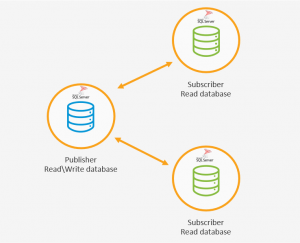
Replication
Vault 2022 has a new replication technology, so that the Publisher is the only read\write location in the environment. This change improves usability by eliminating the need for object Ownership and improve replication stability and reliability.
Participants
The Thin Client has been improved for Participants for a more modern experience.
Support desktop as well as tablets
Multiple tab browser support
New View tab to view 2D/3D designs using the Autodesk Viewer
Access Change Order Information
Support folder/ project links
Multi-select to View & Download
Share desktop or web browser links
The Thin Client user has access to Change Order information, folder\project links, the ability to multi-select files for viewing or downloading.
Users can also share desktop or web browser links via email.
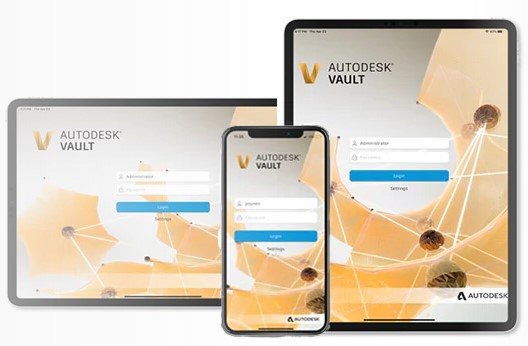
Mobile App
The Vault mobile app for Vault Professional allows users to use a tablet or mobile device to:
View 2D/3D designs
Check non-CAD files in and out
Review, approve, and sign documents
Perform QR, barcode, simple, and extended searches
Create and participate in change orders, and more.
Design Consulting are the Vault Experts
Design Consulting has considerable experience in deploying Vault on-premise and in the cloud and have our own advanced Job Processor for Vault.
If you are looking at deploying Vault for your business, contact us to learn more.
Contact Us
If you would learn more about Autodesk software, please contact us by calling on 1800 490 514, by filling out the form or clicking the live chat in the bottom right-hand corner.