1800 490 514 [email protected]

Autodesk Fabrication Products

DSI fabrication 3693 Moving at the Speed of Business
Autodesk Fabrication Products banner Moving at the Speed of Business

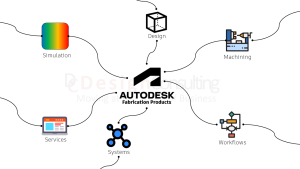
Autodesk has various fabrication software products for manufacturing, architectural construction, HVAC and structural steel applications

Get Fabrication design and analysis software, connect machines, centralise data, connect systems and departments or use our professional services.

Design

Product types and features

Machining

Connect machines to design data

Simulation

Anlalyse structures and optimise designs
cube blk 400 Moving at the Speed of Business
Design
Product types and features
Machining 400 Moving at the Speed of Business
Machining
Connect machines to design data
Simulation 400 Moving at the Speed of Business
Simulation
Anlalyse structures and optimise designs
Services 400 Moving at the Speed of Business
Services
Training, setup, CNC posts, deployment, programming, etc.

Workflows

Workflows between products and systems

Systems

Data management, automation, collaboration, erp/crm, IoT and commerce systems

Services

Training, setup, CNC posts, deployment, programming, etc.
Workflows 400 Moving at the Speed of Business
Workflows
Workflows between products and systems
Access anywhere Moving at the Speed of Business
Systems
Data management, automation, collaboration, erp/crm, IoT and commerce systems

Interactive Map

Use our interactive maps, hover on an object below to learn more about Autodesk Fabrication products and Design Consulting's services.

Interactive Map
Use our interactive maps, hover on an object below to learn more about Autodesk Fabrication products and Design Consulting's services.
Autodesk Fabrication Product DC Ecosystem of products, systems and services from Design Consulting

Explore | Simulation Page

cube blk 400 Moving at the Speed of Business

Design

Autodesk fabrication products range from HVAC systems, structural steel, mechanical to architectural design

Interactive Maps

Explore products, systems, workflows and services for Fabrication.

Compare

Compare Fabrication Design and Machining Products

CADmep

Explore | Visit page

Advance Steel

AEC Collection

Inventor Pro

PD&M Collection

Fusion 360

Fusion Nesting

Interactive Map
Hover on an object below to learn more about Autodesk Fabrication design products
Autodesk Fabrication Products - design products for all types of fabrication

Structural steel detailing and fabrication tool built on AutoCAD.

Explore | Advance Steel Page

Complete toolset for Fabrication in Construction. Combine Advance Steel, CADmep, Revit, Point Layout, AutoCAD, Civil 3D, Navisworks and more

Explore | Architecture Engineering and Construction Collection Page

Create fabrication-intent models of piping, plumbing and ductwork systems.

Explore | CADmep Page

Optimise and automate nesting with the Nesting & Fabrication Extension. Create optimised and associative multi-sheet layouts for cutting on CNC machines.

Explore | Fusion 360 Page

Professional-grade 3D mechanical, sheet metal design and frame design, documentation, and product simulation tools.

Explore | Inventor Professional Page

The first 3D CAD, CAM, CAE, and PCB tool of its kind, connecting your entire product development process into one cloud-based software with sheet metal design tools.

Explore | Fusion 360 Page

Combine Inventor Professional, Inventor CAM, Inventor Nesting, Nastran, Factory Design Utilities, Fusion 360, AutoCAD, Navisworks plus more in the Product Design & Manufacturing Collection.

Explore | Product Design & Manufacturing Collection Page

Machining 400 Moving at the Speed of Business

Machining

Autodesk offer the following solutions for connecting designs to CAM/CNC, plasma/laser cutters and beam line machines.

Interactive Maps

Explore products, systems, workflows and services for Fabrication.

Compare

Compare Fabrication Design and Machining Products

Machining Products

Advance Steel

AEC Collection

PD&M Collection

Fusion 360

Fusion Nesting

Interactive Map
Hover on an object below to learn more about Autodesk Fabrication machining
Autodesk Fabrication Products Machining web full Moving at the Speed of Business

Get Advance Steel, CADmep, Revit, Point Layout, Navisworks, AutoCAD and more.

Explore | AEC Collection Page

Structural steel detailing and fabrication tool built on AutoCAD. Produce DXF's for flat patterns and NC1 code for beam line machines.

Explore | Advance Steel Page

Import designs from CADmep, create flat patterns and prepare designs for machining

Explore | CAMduct Page

Setup and generate CNC posts for 2.5 and 3 axis machining and simulate toolpaths.

Explore | Fusion 360 Page

Setup and generate CNC posts for 2.5 and 3 axis machining and simulate toolpaths. Add the Nesting and Fabrication extension to nest sheet metal parts and generate toolpaths for plasma and laser cutting machines.

Explore | Fusion 360 Page

Setup and optimise nest tables and export to DXF

Explore | PD&M Collection Page

Get 5-axis integrated CAD/CAM with Inventor CAM in the Product Design & Manufacturing Collection 

Explore | Product Design & Manufacturing Collection Page

Combine Inventor Professional, Inventor CAM, Inventor Nesting, Nastran, Factory Design Utilities, Fusion 360, AutoCAD, Navisworks plus more in the Product Design & Manufacturing Collection.

Explore | Product Design & Manufacturing Collection Page

Professional-grade 3D mechanical, sheet metal design and frame design, documentation, and product simulation tools.

Explore | Inventor Professional Page

matrix 400 Moving at the Speed of Business

Compare Fabrication Design and Machining Products

Advance Steel

AEC Collection

Inventor Pro

PD&M Collection

Fusion 360

Fusion Nesting

  • CADmep
  • CAMduct
  • Advance Steel
  • AEC
  • Inventor Pro
  • PD&M
  • Fusion 360
  • Fusion w. Nesting
CADmepCAMductAdvance SteelAECInventor ProPD&MFusion 360Fusion w. Nesting
/year
2D Design
3D Modelling
HVAC
Plumbing
Piping
Costing
2D Detailing
Bill of Materials
Nesting
DXF
CNC Post
Sheet Metal
Frames
Design Automation
Drawing Automation
Ladders
Rails
Porta Buildings
Steel Connection Library
BuyBuyBuyBuyBuyBuyBuyBuy Now
Autodesk Fabrication CADmep Training Fundamentals Course

Fabrication CADmep

Autodesk Fabrication CADmep gives you the ability to create fabrication-intent models of piping, plumbing and ductwork systems. Connect CADmep with ESTmep, CADduct and Revit for complete end to end workflows.
Interactive Map
Hover on an object below to learn more about Autodesk Fabrication CADmep for design and explore machining, workflows, management systems and Design Consulting's services.
Autodesk Fabrication Products- cad-mep ecosystem and workflows of products and services

Import designs from CADmep, create flat patterns and prepare designs for machining

Explore | Fabrication CAMduct Page

Import designs from Revit and export estimating data to CADmep and CAMduct

Explore | Go to Fabrication CAMduct Page

Use Revit software to produce consistent, co-ordinated and complete model-based building designs and documentation for architectural, mep and structural construction projects

Revit Workflows Page | Revit Page

Autodesk Point Layout brings BIM coordinate systems to the jobsite. Connect building models to field construction workflows, with hardware compatibility including Leica, Topcon, Trimble, and more.

Point Layout Page

autodesk fabrication camduct product icon 128 Moving at the Speed of Business

Fabrication CAMduct

Create fabrication-intent models of piping, plumbing and ductwork systems.
Interactive Map
Hover on an object below to learn more about Autodesk Fabrication CADmep for design and explore machining, workflows, management systems and Design Consulting's services.
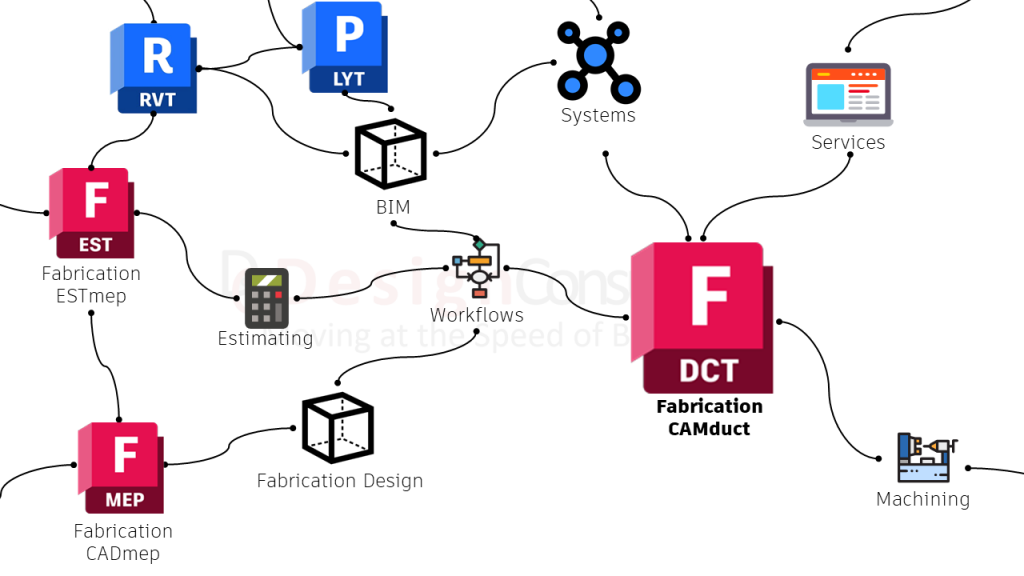
Autodesk Fabrication Products - CAMDuct - webfull

Import designs from CADmep, create flat patterns and prepare designs for machining

Explore | Go to Fabrication CAMduct Page

Import designs from Revit,  costing from ESTmep and send designs over to CAMduct to create flat patterns and prepare designs for machining

Explore | Go to Fabrication CADmep Page

Import designs from Revit and export estimating data to CADmep and CAMduct

Explore | Go to Fabrication ESTmep Page

Use Revit software to produce consistent, co-ordinated and complete model-based building designs and documentation for architectural, mep and structural construction projects

Revit Workflows Page | Revit Page

Autodesk Point Layout brings BIM coordinate systems to the jobsite. Connect building models to field construction workflows, with hardware compatibility including Leica, Topcon, Trimble, and more.

Point Layout Page

autodesk fabrication estmep product icon Moving at the Speed of Business

Fabrication ESTmep

Gain insight into project costs with cost analysis and reporting and generate competitive
Interactive Map
Hover on an object below to learn more about Autodesk Fabrication CADmep for design and explore machining, workflows, management systems and Design Consulting's services.
Autodesk Fabrication Products - ESTmep - web full

Gain insight into project costs with cost analysis and reporting and generate competitive bids.

Autodesk Fabrication ESTmep page

Import designs from CADmep, create flat patterns and prepare designs for machining

Explore | Go to Fabrication CAMduct Page

Import designs from Revit and ESTmep and send designs to CAMduct for manufacturing

Explore | Go to Fabrication CADmep Page

Use Revit software to produce consistent, co-ordinated and complete model-based building designs and documentation for architectural, mep and structural construction projects

Revit Workflows Page | Revit Page

Advance Steel structural steel fabrication, design and detailing software

Advance Steel

Steel detailing software that features a library of intelligent parametric elements, steel connections and plates for steel detailing and fabrication.
Interactive Map
Hover on an object below to learn more about Autodesk Advance Steel for design and explore machining, workflows, management systems and Design Consulting's services.
Autodesk Fabrication Products - Advance Steel - structural steel detailing and machining software

Steel detailing software features a library of intelligent parametric elements, steel connections and plates for steel detailing and fabrication.

Advance Steel Page

Use Revit software to produce consistent, co-ordinated and complete model-based building designs and documentation for architectural, mep and structural construction projects

Revit Workflows Page | Revit Page

Architecture Engineering and Construction Collection

Combine Advance Steel and CADmep with Revit, AutoCAD, Navisworks, Docs, Point Layout and more.
Interactive Map
Hover on an object below to learn more about Autodesk AEC Collection for design and explore machining, workflows, management systems and Design Consulting's services.
Autodesk Fabrication Products - AEC Collection workflows with BIM, Revit, CADmep, Advance Steel, DOCS and Robot Structural Analysis

Document Management and Collaboration for Construction Projects

Autodesk Construction Cloud Page

Get Advance Steel, CADmep, Revit, Point Layout, Navisworks, AutoCAD, Robot Structural Analysis and more.

AEC Collection Page

Structural load analysis software that verifies code compliance and uses BIM-integrated workflows to exchange data with Revit and Advance Steel.

AEC Collection Page

Use Revit software to produce consistent, co-ordinated and complete model-based building designs and documentation for architectural, mep and structural construction projects

Revit Workflows Page | Revit Page

Steel detailing software features a library of intelligent parametric elements, steel connections and plates for steel detailing and fabrication.

Advance Steel Page

Import designs from Revit and ESTmep and send designs to CAMduct for manufacturing

Explore | Go to Fabrication CADmep Page

Autodesk Point Layout brings BIM coordinate systems to the jobsite. Connect building models to field construction workflows, with hardware compatibility including Leica, Topcon, Trimble, and more.

Point Layout Page

Product Design & Manufacturing Collection

Combine Inventor Professional, Inventor CAM, Inventor Nesting, Nastran, Fusion 360 with AutoCAD, Navisworks and more.
Interactive Map
Hover on an object below to learn more about Autodesk PDM Collection for design and explore machining, workflows, management systems and Design Consulting's services.
Autodesk Fabrication Product PDM Collection Moving at the Speed of Business

Get Inventor Pro, CAM, Nesting, Nastran, Fusion 360, AutoCAD Mechanical, Electrical, Navisworks and more.

PDM Collection Page

Non-Linear FEA, thermal and Dynamic Simulation

PDM Collection Page

3D CAD, sheet metal tools, 2.5/3 axis CAM. Synch Fusion 360 and Inventor Models with AnyCAD.

Explore | Fusion 360 Page

3D CAD with sheet metal and frame tools with linear and dynamic simulation. Synch 3D Fusion 360 models with  AnyCAD. Integrated CAM and Nesting in the PDM Collection.

Explore | Inventor Professional Page

Optimise Nesting jobs, work with dwg, dxf or Inventor files in the PDM Collection.

PDM Collection Page

5-axis Integrated CAM and simulate toolpaths with Inventor Professional in the PDM Collection.

PDM Collection Page

Autodesk Inventor Professional 3D mechanical CAD software

Inventor Professional

3D CAD product, mechanical and fabrication design analysis and 2D detailing software
Interactive Map
Hover on an object below to learn more about Autodesk Inventor Professional for design and analysis. Explore workflows, management systems and Design Consulting's services.
Autodesk Fabrication Products Inventor Professional Moving at the Speed of Business

3D CAD with sheet metal and frame tools with linear and dynamic simulation. Synch 3D Fusion 360 models with  AnyCAD. Integrated CAM and Nesting in the PDM Collection.

Inventor Professional Page

Non-Linear FEA, thermal and Dynamic Simulation

PDM Collection Page

3D CAD, sheet metal tools, 2.5/3 axis CAM. Synch Fusion 360 and Inventor Models with AnyCAD.

Explore | Fusion 360 Page

Get Inventor Pro, CAM, Nesting, Nastran, Fusion 360, AutoCAD Mechanical, Electrical, Navisworks and more.

PDM Collection Page

Optimise Nesting jobs, work with dwg, dxf or Inventor files in the PDM Collection.

PDM Collection Page

5-axis Integrated CAM and simulate toolpaths with Inventor Professional in the PDM Collection.

PDM Collection Page

Fusion 360

3D CAD/CAM product, mechanical and sheet metal design and 2D detailing software with extensions for fabrication, machining, simulation and generative design.
Interactive Map
Hover on an object below to learn more about Autodesk Fusion 360 for design, machining and analysis. Explore workflows, management systems and Design Consulting's services.
Autodesk Fabrication Products Fusion 360 and Extensions Moving at the Speed of Business

3D CAD, sheet metal tools, 2.5/3 axis CAM. Synch Fusion 360 and Inventor Models with AnyCAD. Add Extensions for further functionality.

Fusion 360 Page

Optimise and analyse designs for 3D printing

Fusion 360 Page

Non-Linear FEA, thermal and Dynamic Simulation

Fusion 360 Page

Optimise products with generative design and analysis tools.

Fusion 360 Page

3D CAD with sheet metal and frame tools with linear and dynamic simulation. Synch 3D Fusion 360 models with  AnyCAD. Integrated CAM and Nesting in the PDM Collection.

Explore | Inventor Professional Page

Get Inventor Pro, CAM, Nesting, Nastran, Fusion 360, AutoCAD Mechanical, Electrical, Navisworks and more.

Explore | PDM Collection Page

5-axis Integrated CAM and simulate toolpaths.

Fusion 360 Page

Optimise Nesting jobs, create toolpaths for plasma/laser cutters, work with dwg, dxf or Fusion 360 files.

Fusion 360 Page

Simulation

Discover the range of simulation software for Fabrication products
Interactive Map
Hover on an object below to learn more about Autodesk simulation. Explore workflows, management systems and Design Consulting's services.
Autodesk Fabrication Products - Simulation

Heat transfer, drop test, advanced material models, linear statics, bolt connectors, CFD interoperability, response spectrum analysis,  structural analysis, linear buckling, static fatigue, surface contact.

Explore | PDM Collection Page

Get Inventor Pro for linear FEA and Nastran for Non-Linear FEA, thermal and dynamic simulation

PDM Collection Page

Linear FEA, motion analysis and dynamic simulation.

Explore | Inventor Professional Page

Explore structural, thermal and explicit simulation tools, including injection moulding, for manufacturing insights.

Explore | Fusion 360 Page

Structural load analysis software that verifies code compliance and uses BIM-integrated workflows to exchange data with Revit and Advance Steel.

Explore | AEC Collection Page

Get Robot Structural Analysis Professional, Advance Steel, Revit and more.

Explore | AEC Collection Page

Workflows 400 Moving at the Speed of Business

Workflows

Explore the workflows between fabrication products and systems
Interactive Map
Hover on an object below to learn more about Autodesk simulation. Explore workflows, management systems and Design Consulting's services.
Autodesk Fabrication Products Workflows Moving at the Speed of Business

CAD software for HVAC, piping, tubing, sheet metal, structural steel, product and mechanical design 

Explore

Use estimating software for mep, run scripts in Inventor Professional to calculate cost or get an Autodesk Industry Collection and use Navisworks for 2D/3D Quantity Takeoffs

Estimating Page

From HVAC, to NC1 for beamline machines, to 5-axis CAM post to Nesting toolpaths of exports to DXF

Explore

Data management, collaboration, construction management, product or layout configurators and CRM/ERP can all be connected to design, machining, estimating and simulation software.

Explore

Get training, custom scripts or applications, templates, content, systems deployed or connected.

Explore

Structural load analysis and  mechanical design and motion analysis software

Explore

BIM Software and systems to connect models, drawings and metadata.

BIM Page

Access anywhere Moving at the Speed of Business

Systems

Systems connect files, information, departments and people and increase productivity by creating end to end workflows between departments, automating processes, reduce double data entry and provide holistic visibility on data and projects.
Interactive Map
Hover on an object below to learn more about Systems for Fabrication products and explore design, machining, workflows and Design Consulting's services.
Autodesk Fabrication Products - Systems

Vault manages versions, revisions, lifecycles with automated reference management, file numbering schemes and tools to speed up file and folder management.

Vault Page

Customer Relationship and Enterprise Resource Management software to manage records of company, contacts, quotes, inventory, costs, and projects with tools for sales, marketing and operations.

CRM/ERP Page

Cloud file sharing platform with low-latency for synching large datasets between people.

Egnyte

Connect product and layout configurators to your website, CRM/ERP or data management systems.

Visualisation Page

PDF Collaboration, mark-up, measure and quantity take off for 2D and 3D PDF's with add-ins for AutoCAD and Revit.

Bluebeam Page

Construction management software for mark-up, measure, RFI's, issues, compare, bids, costing, take-offs and more.

Construction Cloud Page

File and metadata automation, analytics and access system for Revit and AutoCAD-based projects such as AutoCAD, Civil 3D, Plant 3D Advance Steel and CADmep/ESTmep/CAMduct with the ability to connect to construction management systems such as Autodesk Construction Cloud/BIM 360, ProjectWise, ProCore and cloud sharing platforms such as Egnyte, SharePoint, Dropbox, Google Drive and more.

Clarity Page

Services 400 Moving at the Speed of Business

Services

Design Consulting provides a range of services for Autodesk Fabrication products such as CNC posts for CAMduct, Inventor CAM and Fusion 360, drawing templates, content creation, training, system deployments, programming and more.
Interactive Map
Hover on an object below to learn more about Services for Fabrication products and explore design, machining, workflows and Design Consulting's services.
Autodesk Fabrication Products services Moving at the Speed of Business

Drawing and model templates and content creation (Duct & piping libraries, structural steel libraries and connections, Content Center libraries and Revit Families), drawing styles and standards and sheet metal templates.

Services Page

CNC posts and toolpaths to connect design to machines for CAMduct, Inventor CAM, Fusion 360 and Fusion 360 Nesting Extension

Services Page

LISP routines, AutoCAD scripts, Inventor iLogic scripts, Revit macros, Dynamo scripts PyRevit scripts and custom integrations and applications.

Programming Page

Design, analysis and visualisation Contractor Services

Contractor Services Page

Structured or customised training courses.

Training Page

Get in Touch

Contact Form Demo

VIEW MORE

Autodesk Releases Inventor 2021.2

inventor 2021 badge 1024px Moving at the Speed of Business

Autodesk has released the latest 2021.2 version for Inventor on 30/10/2020 and looking through the list, I find that the list is on improvements and resolving issues rather than new features and functionality.

Here’s the list below. For more information visit the Autodesk Inventor Help page

 
Design Consulting Autodesk Inventor Professional Dynamic Simulation 2 Moving at the Speed of Business

Add-Ins – Cable and Harness

Resolved a Cable & Harness Loom style color cannot be updated issue. INVGEN-41120

Resolved issue where visibility of the components setting is ignored when editing a Cable & Harness sub assembly. INVGEN-43727

Add-Ins – Content Center

Resolved issue where the Place from Content Center icon (Ribbon) switched to Place icon during placing a component from Content Center. INVGEN-32831

Resolved issue where columns with formulas that reference other columns weren’t working correctly. INVGEN-36130

Resolved issue where Content Center commands were enabled for non-master positional representations when switching between documents. INVGEN-37050

Improved performance when placing large Content Center families. INVGEN-39031

Resolved issue for the Chinese version where Boolean values were translated in the opposite direction. INVGEN-43480

Add-Ins – Design Accelerator

Improved the constraint behavior of bolted connections (BC) by applying temporary ground constraints to keep the BC in position when constraining to them. Temporary constraints are removed afterward. INVGEN-39989

Resolved issue preventing bolted patterns from following the pattern after being edited. INVGEN-41252

Resolved error messaging issue, it is improved for cases where template report files aren’t accessible. INVGEN-41345

Resolved issue that the bolted connection did not insert the correct bolt length. INVGEN-41805

Resolved issue where the bolted connection generator created Through All holes instead of To Face holes. INVGEN-42562

Resolved a refresh Content Center Standard Parts with Bolted Connection sub-assembly issue. INVGEN-42851

Resolved issue that prevented changing the shaft generator element type or deleting the element. INVGEN-43202

Resolved issue that bolted connections did not work properly when the sub-assemble structure was disabled. INVGEN-44310

Resolved issue where Bill of Materials didn’t update correctly after using the Bolted Connection Follow pattern setting. INVGEN-44383

Add-Ins – Frame Generator

An additional index is added at the end of the file name to avoid duplicating file names. INVGEN-39016

Frame Generator property panel. Moved “Zoom” label away from border. INVGEN-39378

Improved stability when working with Frame Generator. INVGEN-41396

Add-Ins – Mold Design

Resolved issue with displaying saved Part Fill Analysis results after reopening the file. INVGEN-2884

Resolved a performance issue with imported data in Mold Design Generate core and cavity. INVGEN-40356

Add-Ins – Simulation

Resolved issue where saved Inventor files (when using the Centaur addin) did not include FEA results when re-opened. INVGEN-41945

Add-Ins – Simulation – Stress Analysis

Improved performance when moving an FEA probe tag. INVGEN-43601

Add-Ins – Task Scheduler

Resolved issue preventing Task Scheduler from  checking files into Vault as part of a migration task. INVGEN-41548

Add-Ins – Tube and Pipe

Resolved issue where file naming defaults and indexing for Tube & Pipe run locations weren’t working correctly. INVGEN-37052

Resolved the issue where dimensions applied to a route did not persist when the Auto Dimension option is OFF. INVGEN-40329

It’s now possible to promote/demote tube and pipe content center components when they are outside the scope of tube and pipe assemblies. INVGEN-40379

Resolved issue preventing you from moving Tube and Pipe components in the browser. INVGEN-41253

Resolved a Tube and Pipe issue where Copy run doesn’t offer unique filenames for populated copied components. Now, when a run with populated route/s is copied, unique filenames for populated components are offered to finish the workflow. INVGEN-43243

Resolved issue where a Tube & Pipe assembly lost its adaptivity. INVGEN-43341

Improved stability when editing a Tube & Pipe route in some models. INVGEN-43347

Improved stability when editing routes in the Tube & Pipe environment. INVGEN-43616

Resolved issue where it was not possible to snap a tube and pipe component to the route end point during component placement. INVGEN-44122

Resolved issue where an unpopulated route did not update and later populate. For 2021 and earlier versions of Inventor. INVGEN-44277

Resolved issue where there are missing context menu commands during tube and pipe fitting placement. INVGEN-46146

Add-Ins – iLogic

Resolved issue where iLogic Form wouldn’t function after changing the Level of Detail and accessing the Bill of Materials. INVGEN-36380

Removed the Page Setup command from the rule editor toolbar. INVGEN-36993

In the iLogic rule editor, autocomplete now works for function parameters. INVGEN-39827

Read only parameters now have a different background color than read/write INVGEN-42780

Resolved issue causing iLogic forms to take a long time to refresh. INVGEN-43789

Resolved issue with Migrate ETO names where Inventor displayed an error or failed to migrate names. INVGEN-44408

Resolved iLogic UI issues related to dark theme. INVGEN-45661

Resolved issue with the Dark Theme where the the Publish 3D PDF dialog box would become too dark to read after creating an iLogic rule. INVGEN-46367

AnyCAD

The units of measure defined in Revit data file are now respected during import INVGEN-38659

Resolved issue where the Resolve Link dialog box would display when importing a Pro-e assembly. INVGEN-45694

Assemblies

Improved stability when enabling Suppress on the iProperties/Occurrences tab for a component. INVGEN-43768

Assemblies – BOM

Resolved issue where copying cells in the Bill of Materials would incorrectly overwrite the Quantity and Thumbnail values. INVGEN-42397

Resolved issue where the Bill of Materials Expand All Children setting wasn’t working. INVGEN-42435

Improved stability when working with iAssemblies Bill of Materials. INVGEN-43703

Assemblies – Constraints-Joint-Assemble

Resolved issue that iMate fails to match after replacement. INVGEN-42147

Assemblies – Copy Object

Resolved incremental file naming issue in Copy Component. INVGEN-39719

Assemblies – Design Views

Improved stability when using the undo and redo commands. INVGEN-42611

Resolved issue where Modify Design View Representation changes were not being saved in an assembly. INVGEN-42770

Assemblies – Features-Sketch

Resolved issue where Include Geometry in a 3D Sketch would not create fully constrained geometry. INVGEN-42390

Assemblies – Mirror-Copy-Replace

Resolved issue where Copy Components would corrupt the file when reusing an existing instance. INVGEN-45644

Drawings

Improved stability when working in the drawing environment. INVGEN-39174

Drawings – Tables

Resolved issue that Inventor failed to set the hole table origin at existing center mark. INVGEN-41662

Drawings – True Connect

Resolved issue where the drawing file size was increased after adding iProperties. INVGEN-37773

Drawings – Views

Resolved issue that 2D constraints were lost in a section view that used projected geometry when the angle of the reference geometry was updated . INVGEN-31205

Resolved issue where the initial drawing scale was not correct. INVGEN-44129

Resolved issue where Realign Auxiliary Views command persisted a raster view when Exported to PDF/DWF. INVGEN-44136

Resolved issue preventing pasting a view into the same location as the original view when the cursor is on sheet. INVGEN-44726

Parts

Resolved a stability issue when a derived sheet metal part is resolved to a new file and an update is pending. INVGEN-45273

Parts – 2D Sketch

Resolved a performance issue that occurred when creating sketch patterns. INVGEN-36776

Parts – Derive

Improved stability when editing a derived part sketch. INVGEN-44268

Parts – Extrude-Revolve-Sweep-Coil

Improved performance of Extrude Through All. INVGEN-43112

Parts – Fillet-Chamfer

Improved stability when using fillet to select an edge loop on a non-active component. INVGEN-43787

Improved stability when creating fillets. INVGEN-44154

Resolved issue where applying a variable fillet atop another fillet would exit Inventor, INVGEN-44971

Parts – Hole-Threads

Improved stability when creating a Hole during edit-in place after turning on “Allow Center Point Creation” and placing a Hole center point. INVGEN-43698

Parts – Measure

Improved stability when editing a drawing dimension while a modeless dialog is displayed. INVGEN-44959

Parts – Sheet Metal

Improved stability of the Refold feature. INVGEN-3353

Resolved issue about an API query for FlatBendResult.Bend hangs inventor. INVGEN-44872

Platform

Resolved issue where the custom template paths did not populate the  Application Options/File tab fields when using  /IMPORTOPTIONS on Inventor start up. INVGEN-37765

Improved stability of Inventor close when working in the VBA editor. INVGEN-41209

Improved stability when using the und and redo commands. INVGEN-41614

Resolved issue where Save As wasn’t checking to see if another document with the same filename was already open. INVGEN-41661

Improved stability when creating a sketch and an invisible insertion point was corrupt. INVGEN-43763

Platform – Framework

Improved stability when copying and pasting work geometry. INVGEN-45716

Platform – Graphics

Improved stability when editing a sketch pasted from an AutoCAD drawing. INVGEN-42066

Presentations

The last selected option in the tweak command is retained in the current Inventor session. INVGEN-11506

Translators

Resolved issue where the component color was missing when importing Pro/E assembly files. INVGEN-28934

Improved stability when importing an NX assembly which contains parts with issues. INVGEN-41550

Resolved missing face color issue when importing certain step files. INVGEN-42138

Resolved issue where AnyCAD Catia components were in the wrong position when exported to a STEP file. INVGEN-42305

Resolved issue where Export to STEP 242 or to JT, caused unexpected termination. INVGEN-43314

Translators – DWG-DXF

Resolved issue that title block text shifted when exported to an AutoCAD DWG file. INVGEN-44331

Tutorial Framework

Resolved issue preventing you from sharing Guided Tutorials. INVGEN-43609

Resolved issue preventing you from allowing the Tutorial Gallery to work properly with a Proxy server setup. This requires the Windows environment variables: http_proxy and https_proxy. INVGEN-43662

UI

Resolved issue that the Nastran Convergence Settings icon was missing in the Inventor 2021 dark theme. INVGEN-42777

Resolved issue on My Home where the document number wasn’t showing up in the Recent Document section. INVGEN-44172

Resolved issue that the in-canvas edit box did not accept input when the model was open in a separate window. INVGEN-45983

UI – Browser

Fixed the color of the ‘unresolved’ icon for dark mode. INVGEN-43860

Improved the stability of suppressing unresolved content center files. INVGEN-44379

UI – Customization

Resolved issue that 3DA and Vault commands were removed from Quick Access Toolbar after restarting  Inventor twice. INVGEN-43198

Resolved issue where a Macro button vanished from a custom panel after adding an optional parameter to the method. INVGEN-46035

UI – Mini Toolbar

Resolved issue causing View Navigation to respond very slowly when the appearance Adjust command is active under Dark theme. INVGEN-43761

Contact Us

If you would to discuss Autodesk software, please contact us by calling on 1800 490 514, by filling out the form or clicking the live chat in the bottom right-hand corner.

Contact Us Moving at the Speed of Business

VIEW MORE

Product Design & Manufacturing Collection

Autodesk PDM Collection - Product Design & Manufacturing Collection. Includes Inventor Professional, AutoCAD, Inventor Nastran, Nesting, CAM, 3ds Max, Navisworks, Fusion 360 and more

Autodesk PDM Collection

Autodesk Product Design & Manufacturing Collection is a complete set of tools for the design, analysis, visualisation, documentation and manufacturing of products for manufacturing, industrial design, fabrication and defence.
Inventor Professional
Professional grade electromechanical 3D CAD software that can design products, plastics, sheet metal, weldments, automate, simulate, produce bills of materials, 2D fabrication level detailing and documentation.
Learn More
AutoCAD
Specialised toolsets for Architecture, Mechanical, Plant, Electrical,GIS design and drafting.
Learn More
Fusion 360
Powerful cloud based 3D CAD/CAM software for product design
Learn More
Inventor CAM
2.5 to 5 axis CAM
Learn More
Inventor Nastran
Non-Linear FEA simulation
Learn More
Navisworks Manage
Model coordination, project review, 2D/3D quantity take off, 5D scheduling and clash detection
Learn More
Estore
Get the Product Design & Manufacturing Collection on an Annual Subscription
Buy Now
Previous slide
Next slide

Buy now and get another $400 of value at no additional cost!

Premium Technical Support

Free Onboarding Session

30 Day Money Back Guarantee

Credit Cards Accepted

Overview

What is the Product Design & Manufacturing Collection?

Compare

Compare the PDM Collection to Inventor Professional and Inventor LT.

Included Software

See what software is included in the PDM Industry Collection.

Add-ons

Programs and plug-ins to boost productivity.

Blog

Learn about products, workflows and related products.

PDM Collection Overview

The Autodesk PDM Industry Collection is a compilation of software titles for the manufacturing industry which gives the ability to 3D model, design, automate, visualise, animate, simulate, document and draft designs in 2D.

  • Create high-tolerance, fabrication level detailed designs for electromechanical products and fabricated structures.

  • Optimise designs with analysis, generative design, visualisation and simulation tools.

  • End to end CAD/CAM digital prototyping solution.

Integrated CAD/CAM and Nesting

The Product Design & Manufacturing Collection comes with Inventor CAM and Inventor Nesting, being one of the few, if only product set in the market with the exceptional 3D CAD modelling and detailing features of Inventor with integrated 2.5 to 5 axis CAM and Nesting..

Inventor and AutoCAD Workflows

Use the right tool for the right job. Reference AutoCAD 2D CAD data into Inventor designs and drawings and detail Inventor models in AutoCAD.

Inventor and Fusion Workflows

Use Fusion 360 generative design studies to explore design alternatives and optimise product preformance or cost.

Inventor and Revit Workflows

Reference Revit projects and use Inventor BIM interoperability tools to publish BIM data to Revit and other sources.

Included Software

The most comprehensive selection of cutting-edge BIM and CAD design, visualisation and analysis software and cloud tools comes within the AEC Collection.

Inventor Professional

Tools for parts and assembly modelling, automation, sheet metal, weldments, electrical, tube & pipe, bills of materials and 2D detailing.

Fusion 360

Cloud based CAD/CAM for PC and Mac with simulation and PCB design.

Inventor Tolerance Analysis

Analyse tolerances and the impact of variations in dimensions.

AutoCAD

2D/3D design and drafting software with specialised toolsets for mechanical, electrical schematics, plant design, GIS and more.

Inventor Nesting

Integrated parametric nesting software for Inventor Professional.

Navisworks Manage

Project coordination, data aggregation, 5D scheduling, quantification, simulation and visualisation software.

Inventor CAM

Integrated 2.5 to 5 axis CAM for Inventor Professional with automation and simulation.

Recap Pro

Reality capture, photogrammetry and 3D scanning point cloud software.

Inventor Nastran

Non-Linear FEA integrated into Inventor Professional.

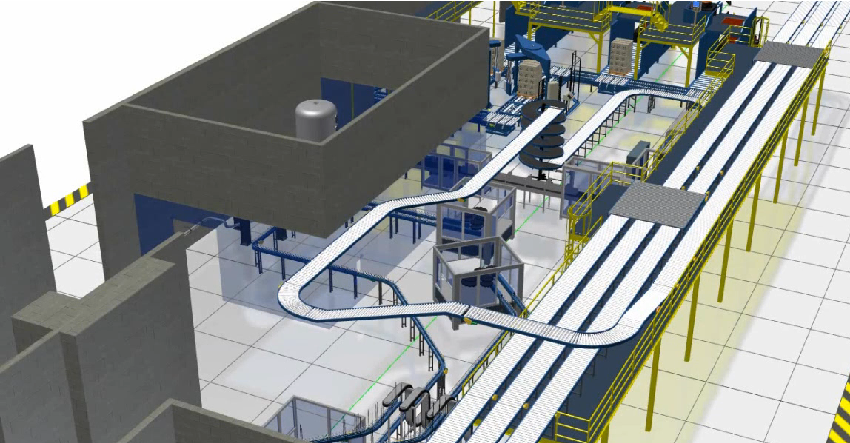
Factory Design Utilities

Process analysis and 2D/3D layout tools for AutoCAD, Inventor Professional and Navisworks.

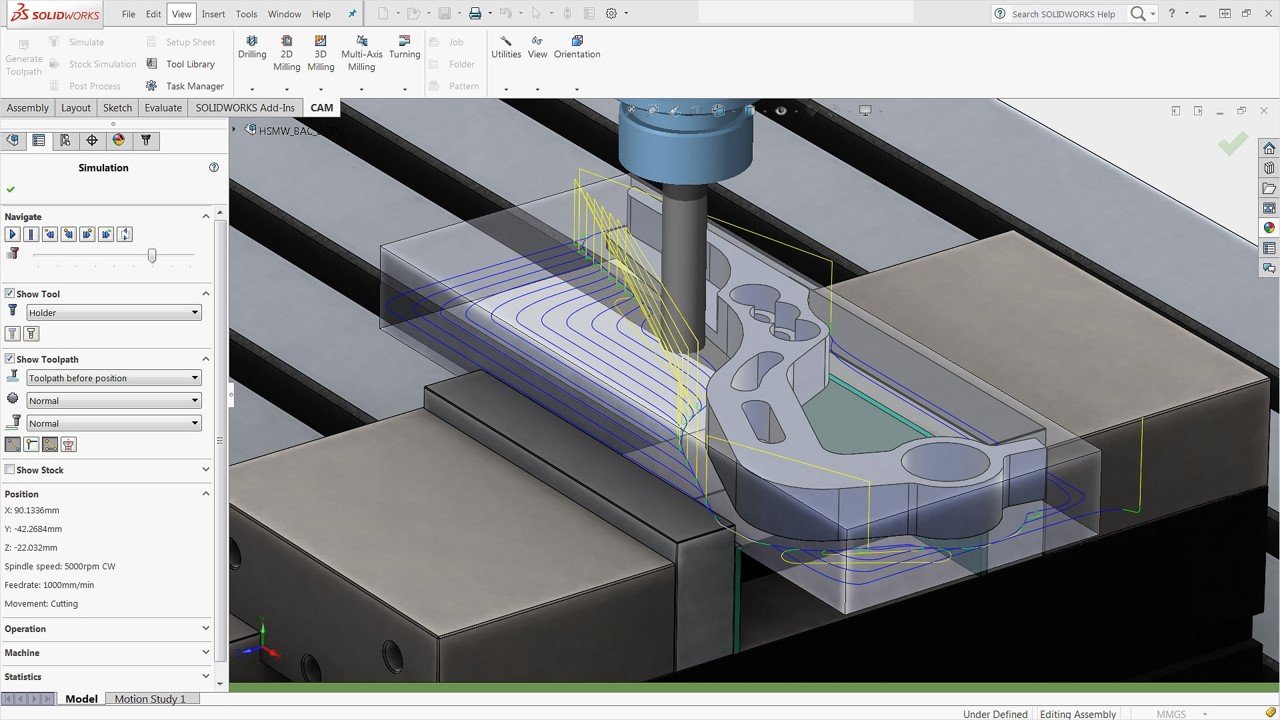
HSM Works

Integrated 2.5 to 5 axis CAM for Solidworks.

3ds Max

3D modelling, rendering, animation and simulation software.

Autodesk Rendering

Cloud based rendering for Revit, 3ds Max, Navisworks and AutoCAD.

Autodesk Drive

Cloud storage and collaboration for CAD.

Compare

Compare the Product Design & Manufacturing Collection to other products such as Inventor Professional, AutoCAD Inventor LT suite and Inventor Professional LT.

  • PDM Collection
  • Inventor Professional
  • AutoCAD Inventor LT Suite
  • Inventor LT
PDM CollectionInventor ProfessionalAutoCAD Inventor LT SuiteInventor LT
3D Parametric Part Modelling
B-REP surfacing, solid body and multi-body part modelling
Direct Editing
Direct editing (push-pull) part modelling environment
Freeform Modelling
NURBS with T-Splines part modelling environment
Plastic Part Design
Mold and die modelling environment
Local Rendering
Ray-trace rendering on your PC
2D Design
2D design functionality in AutoCAD or AutoCAD LT
2D Drafting
2D views, annotations, leaders, etc.
3D Parametric Assembly Modelling
Place multiple parts in an assembly file and use constraints and joints to assemble
Weldments
Weldment assembly environment used with frame generator to model structural frames
Sheet Metal Modelling
Tools for sheet metal design, flat patterns and 2D symbols and annotations
Electrical Cable and Harnessing
Tools tools to route electrical cables, harnesses and detail nailboards
Electrical Schematics
Design electrical control systems and switchboards with reports such as from/to and wire lists
EMX Project
Synch between AutoCAD Electrical schematicsand Inventor Professional cable harnesses
Tube and Piping
Tools to design flexible hose, tubes and pipes
Design Automation
Simplified code and forms to automate 3D model, drawings and connect to Excel
Content Centre Library
Customisable library of parts such as steel profiles and fasteners
Draft Analysis
Analyse drafts
Clash and interference detection
Detect clashes or interferences between parts in assemblies
Material cost/impact
Ability to select a material based on the environmental/cost impact
BIM Interoperability
Prepare models and export to RFA, adsk or IFC
Point Clouds
Import point clouds via Recap
Point Cloud Pre-Processing
Tools found in Recap Pro
Bill of Materials
Create bills of materials and tabvles from parts and assemblies
AnyCAD
Associative import of CAD parts and assembly files
Application Programming Interface (API)
Install plug-ins, create plug-ins, macros and run Dynamo scripts
Linear FEA
Linear and Dynamic FEA simulation studies
Non-Linear FEA
FEA tools in Inventor Nastran
CAM
Features found in Inventor CAM and HSMWorks
Nesting
Nesting tools in Inventor Nesting
Tolerance Analysis
Features found in Inventor Tolerance Analysis
Architecture Design
Features found in AutoCAD specialised toolsets
GIS Mapping
Features found in AutoCAD specialised toolsets
Raster Tools
Features found in AutoCAD specialised toolsets
Plant Design
Features found in AutoCAD specialised toolsets
P&ID Schematics
Features found in AutoCAD specialised toolsets
Clash Detection
Features found in Navisworks Manage
5D Scheduling
Features found in Navisworks Manage
Project Review and Coordination
Features found in Navisworks Manage
Production Rendering and Animation
Features found in 3ds Max
Process Analysis
Bottleneck simulation and reporting for factory and assembly line layouts
Synch AutoCAD and Inventor Professional
2D/3D Factory Assets to synch AutoCAD 2D layouts with Inventor Professional 3D models

PDM Collection Add-Ons

Check out these programs and plug-ins to boost productivity even further.
Enterprise data management.
Additive manufacturing simulation and optimisation.
Cloud Collaboration with Fusion 360 Team Participant
Machine tool probing software for on machine verification and inspection.
Computational Fluid Dynamic software to simulate loads, air and fluid flows.
Injection mold simulation software

Contact Us

If you would like to learn more about Autodesk Product Design & Manufacturing Collection, please contact us by calling on 1800 490 514, by filling out the form or clicking the live chat in the bottom right-hand corner.

Contact Us Moving at the Speed of Business

VIEW MORE