1800 490 514 [email protected]

Revit LT

Autodesk Revit LT Architectural BIM 3D modelling and documentation software

Revit LT

Affordable BIM software to design architectural building projects.

No posts found!

Overview

What is Autodesk Revit LT?

Compare

Compare Revit LT to Revit.

Features

See what Autodesk Revit LT can do.

Add-ons

Programs and plug-ins to boost productivity.

Pricing

Subscription pricing and comparisons.

Blog

Learn about products, workflows and related products.

Overview

Design architectural projects and document construction drawings.

  • 3D Modelling with tools for architectural design.

  • Parametric design updates floor plans elevations and section views when the model is modified.

Features

Autodesk AutoCAD Revit LT Suite and Revit. Autodesk Revit training, fundamentals, advanced and family management training.

Architectural Design

Model building elements such as walls, floors, ceilings, doors, windows, etc.

Parametric Design

Create associative models where parameters and design changes update referenced components, views and schedules.

Schedules

Generate reports and material take-offs such as door schedules extracted from model parameters and properties.

Annotations

Communicate design intent with WYSIWYG annotated editing features.
Autodesk Revit and Revit lt bim architectural software

Interoperability

Import, export and link data and files from numerous formats, including IFC4.

Cloud Rendering

Off load photo-realistic rendering jobs to the cloud

Pricing

Buy Revit LT on an Annual Subscription or 3 Year Subscription. Get more value from the AutoCAD Revit LT Suite. Please note that all prices quoted below exclude GST.

Click on any of the images below to learn more about other LT Products

Compare

Compare Revit, AutoCAD Revit LT suite and Revit LT.

  • AEC Collection
  • Revit
  • AutoCAD Revit LT Suite
  • Revit LT
AEC CollectionRevitAutoCAD Revit LT SuiteRevit LT
$Call for Price
/year Incl. GST
$Call for Price
/year Inc. GST
$Call for Price
/year Ex. GST
$Call for Price
/year Ex. GST
3D Modelling
3D CAD Modelling functionality in Revit
2D Design
2D design functionality in AutoCAD or AutoCAD LT
2D Drafting
2D views, annotations, leaders, etc.
Architectural Modelling
Tools to model architectural elements such as floors, walls, doors, etc.
Structural Modelling
Tools to model structural steel and concrete elements
LimitedLimited
MEP Modelling
Tools for mechanical, electrical and piping elements
Parts and Assemblies
Ability to break up designs in Revit into parts and assemblies
Solar Studies
Conduct solar studies in Revit
Global Parameters
Drive other parameters in Revit
Conceptual Massing
Fast way to model 3D mass objects
Local Rendering
Ray-trace rendering on your PC
Cloud Based Rendering
Off-load rendering to the cloud. High resolution renders cost cloud credits.
Analysis
Area, analytic model, structural loads, boundary conditions, heating and cooling loads, massing studies
Schedules
Create schedule and material take-off reports
Collaboration
Interference checks, copy/monitor, worksharing, share coordinates among projects and Revit server
Copy/paste elements in linked Revit files
Ability to copy/paste elements between Revit files that are linked into the Revit project.
Linked Revit file visibility customisation
Control the visibility ofelements of Revit projects that have been linked
Point Clouds
Import point clouds via Recap
Standard Revit Exporters
Export to DWG, DGN, DWF, Images, FBX, NWC and reports
Additional Revit Exporters
SAT, ADSK, gbXML, ODBC, family types
Application Programming Interface (API)
Install plug-ins, create plug-ins, macros and run Dynamo scripts
Add to CartAdd to CartAdd to CartAdd to Cart

Click on any of the images below to learn more about other LT Products

Contact Us

If you would learn more about Autodesk software, please contact us by calling on 1800 490 514, by filling out the form or clicking the live chat in the bottom right-hand corner.

VIEW MORE

AutoCAD LT

autocad lt 2021 badge 1024px Moving at the Speed of Business

Autodesk AutoCAD LT

Industry leading 2D Design and Drafting CAD software.

Overview

What is AutoCAD LT?

Features

See what AutoCAD LT can do.

Pricing

Pricing comparisons.

Compare

Compare AutoCAD LT to AutoCAD.

Blog

Learn about workflows and related products.

Overview

Autodesk AutoCAD LT is 2D CAD software that can be used for all industries to design, review, annotate, draft and document.

Work anywhere anytime

Use cloud storage, web and mobile apps to be always connected to your projects, designs, clients and team members.

Share, view, design, draft and annotate on any device, anywhere, anytime.

Features

Check out what’s new with AutoCAD, extended workflows, 2D drafting and 3D modelling capabilities.

Compare versions of drawings.

Compare XREF versions.

Blocks Palette enhancements.

Experience faster performance with improved save and install times and multicore CPU support for orbit, pan and zoom.

Open, view, edit and create drawings on any desktop, web or mobile device.

Access any DWG file with Autodesk cloud storage or through other leading cloud storage providers.

Quick Measure by hovering over with the mouse.

Compare two versions of a drawing inside the current window.

Easily purge and remove multiple objects simulataneously.

Create single text objects from single or multi-line text.

Automatic dimension creation with preview capabilities.

Create leaders from text or blocks with comprehensive formatting tools.

Create and edit centrelines and centre marks that are referenced to associated objects and move collectively  

Create data tables with rows and columns for data, attributes, symbols and hyperlinks. Apply formulas and link spreadsheets to tables.

Collaborate and mark-up drawings with revision clouds.

Name views in layouts and easily find them.

Setup templates by nominating sheet size, placing title blocks and place multiple views to annotate.

Use intelligent fields in text objects that automatically update when field values are modified.

Design Consulting Autodesk AutoCAD Link Excel 1 Moving at the Speed of Business

Live link Excel spreadsheets with AutoCAD drawing tables.

Design Consulting Autodesk AutoCAD Data Extraction Moving at the Speed of Business

Extract valuable meta data from objects, blocks, attributes and drawing information.

Design Consulting Autodesk AutoCAD Dynamic Blocks Moving at the Speed of Business

Use Dynamic blocks to create configurable blocks that automatically change shape or size based on a configuration or field modification.

Exceptional Value

Get AutoCAD LT or bundled in with Inventor LT or Revit LT in a Suite. Prices quoted below exclude GST.

AutoCAD LT

GET 3YRS AND SAVE!
$ 3 Year Subscription
  • Discounted
  • Price locked in for 3 Years
  • Includes updates and support
Popular

Compare

Compare AutoCAD and AutoCAD LT.

  • AutoCAD
  • AutoCAD LT
AutoCADAutoCAD LT
$Call for Price
/year Ex. GST
$
/year Ex. GST
2D Design
2D design, sketching and block tools with model space
2D Drafting
Place views from model space and annotate drawings with dimensions, leaders, symbols, hatching, etc,
Link to Excel
Link design tables to Excel
Import PDF
Import and convert PDF's to AutoCAD vector
Revision Clouds
Create revision clouds for collaboration
3D Modelling
Solid, surface and mesh objectsmodelling tools with model space
Express Tools
Over 80 LISP routines to automate tasks
Rendering
Render photo realistic models from 3D models
Cloud Rendering
Send render jobs to Autodesk cloud rendering service
Import point clouds
Import recap point cloud files
Basic rendering
Hypershade, visor, shaderFX, colour management, DX11, HLSL and CgFX support (Features may differ between 3ds Max and Maya)
Open API
Create or use custom plug-ins and Viewport 2.0 API
Specialised Toolsets
AutoCAD Architecture, Electrical, MAP 3D, MEP, Plant 3D and Raster Design
Buy NowBuy Now

Click here to learn more about other LT Products

Contact Us

If you would learn more about Autodesk AutoCAD software, please contact us by calling on 1800 490 514, by filling out the form or clicking the live chat in the bottom right-hand corner.

VIEW MORE

Revit

Autodesk Revit Software for BIM, Archiecture, MEP and Structural design, analysis, detailing and documentation
Revit text badge Moving at the Speed of Business

Autodesk Revit

Industry leading BIM software to design architectural, structural and MEP building projects.

Premium Technical Support

Free Onboarding Session

30 Day Money Back Guarantee

Credit Cards Accepted

Overview

What is Autodesk Revit?

Compare

Compare the AEC Collection to Revit and Revit LT.

Features

See what Autodesk Revit can do.

Add-ons

Programs and plug-ins to boost productivity.

Pricing

Subscription pricing and comparison to the AEC Collection.

Blog

Learn about products, workflows and related products.

Overview

Design architectural, structural and MEP projects, analyse solar studies, structures and flow and document construction drawings.

  • 3D Modelling with tools for multi-discipline design.

  • Parametric design updates floor plans elevations and section views when the model is modified.

  • Collaborate across teams and disciplines.

Features

Parametric Design

Create associative models where parameters and design changes update referenced components, views and schedules.

Worksharing

Work as a team or with other disciplines on a centrally shared file.

Schedules

Generate reports and material take-offs such as door schedules extracted from model parameters and properties.
Autodesk Revit and Revit lt bim architectural software

Interoperability

Import, export and link data and files from numerous formats, including IFC4.
Autodesk plug ins thumb Moving at the Speed of Business

Plug-ins

Revit has an open application programming interface (API) for custom add-ins to run and connect to. 

Annotations

Communicate design intent with WYSIWYG annotated editing features.

Global Parameters

Create and use project wide parametric parameters within the project file and families. 
Autodesk Dynamo Training Fundamentals Course. For Revit, Advance Steel or Civil 3D or customised to suit your project needs.

Dynamo

Visual scripting tools top generate designs, automate tasks and extract information.

Conceptual Design

Revit has an open application programming interface (API) for custom add-ins to run and connect to. 

Architectural Design

Model building elements such as walls, floors, ceilings, doors, windows, etc.

Point Clouds

Import 3D laser scans directly into the BIM model.

Visualisation

Navigate through 3D models to validate designs and render photo realistic images.

Stairs

Design multi-storey stairs, railings, ramps with ease.

Cloud Rendering

Off load photo-realistic rendering jobs to the cloud

Analytical Model

Compare the structural analytical model with changes made in the physical model. Apply loads, set boundary conditions, very models with design rules and link models to external analysis software.

Reinforcement Detailing

3D model, 2D fabrication detailing and rebar schedule concrete structures such as precast panels and cast-in place.

Structural Design

Structural tools for beams, systems, connections, trusses, columns, floors, walls, slabs, rebar and more.
Design Consulting Revit Documentation with steel details Moving at the Speed of Business

2D Detailing

Create precise engineering drawings of structural steel and concrete designs with dimensions, annotations, tags and schedules.

HVAC Design

Design and detail mechanical systems such as ducts, air terminals and equipment. Design piping systems and components. Automatically calculate and select specific sizes for the system in the project.

Electrical Design

Model and document electrical wiring systems, cable trays, conduit, equipment, devices and lighting fixtures.

Extended Features

Increase productivity with these features found in the AEC Collection and BIM 360.

Generative Design

Create generative design studies to quickly view alternate designs

Collaboration 

See how easily you can collaborate with internal teams and external stakeholders with BIM 360 Design.

Energy Analysis

Optimise energy performance of buildings

Revit + Advance Steel

Synchronise between Advance Steel and Revit to collaborate with structural steel fabricators. 

Conceptual Analysis Workflows

Use Revit with FormIT, Insight and Dynamo for conceptual design with energy analysis and visual scripting.

Structral Design and Analysis Workflows

Combine Revit, Advance Steel and Robot to design, engineer and fabricate structural projects.

Infrastructure BIM Workflows

Combine Revit, Civil 3D and Infraworks for bridge analysis and design. Use Civil 3D road geometry in Infraworks to layout the bridge and run analysis and then publish to Revit.

Pricing

Buy Revit on an Annual Subscription or 3 Year Subscription. Get more value from an Architecture Engineering and Construction Collection. Please note that all prices quoted below exclude GST.

Compare

Compare the AEC Collection to other products such as Revit, AutoCAD Revit LT suite and Revit LT.

  • AEC Collection
  • Revit
  • AutoCAD Revit LT Suite
  • Revit LT
AEC CollectionRevitAutoCAD Revit LT SuiteRevit LT
$4,170
/year Ex. GST
$3,410
/year Ex. GST
$775
/year Ex. GST
$635
/year Ex. GST
3D Modelling
3D CAD Modelling functionality in Revit
2D Design
2D design functionality in AutoCAD or AutoCAD LT
2D Drafting
2D views, annotations, leaders, etc.
Architectural Modelling
Tools to model architectural elements such as floors, walls, doors, etc.
Structural Modelling
Tools to model structural steel and concrete elements
LimitedLimited
MEP Modelling
Tools for mechanical, electrical and piping elements
Parts and Assemblies
Ability to break up designs in Revit into parts and assemblies
Solar Studies
Conduct solar studies in Revit
Global Parameters
Drive other parameters in Revit
Conceptual Massing
Fast way to model 3D mass objects
Local Rendering
Ray-trace rendering on your PC
Cloud Based Rendering
Off-load rendering to the cloud. High resolution renders cost cloud credits.
Analysis
Area, analytic model, structural loads, boundary conditions, heating and cooling loads, massing studies
Schedules
Create schedule and material take-off reports
Collaboration
Interference checks, copy/monitor, worksharing, share coordinates among projects and Revit server
Copy/paste elements in linked Revit files
Ability to copy/paste elements between Revit files that are linked into the Revit project.
Linked Revit file visibility customisation
Control the visibility ofelements of Revit projects that have been linked
Point Clouds
Import point clouds via Recap
Standard Revit Exporters
Export to DWG, DGN, DWF, Images, FBX, NWC and reports
Additional Revit Exporters
SAT, ADSK, gbXML, ODBC, family types
Application Programming Interface (API)
Install plug-ins, create plug-ins, macros and run Dynamo scripts
Energy, lighting, solar analysis
Features found in Insight
Non-Linear Structural Analysis
FEA tools in Robot
Civil Infrastructure Design
Tools in Civil 3D and Infraworks
Structural Steel Detailing
Features found in Advance Steel
Electrical Schematics
Features found in AutoCAD specialised toolsets
GIS Mapping
Features found in AutoCAD specialised toolsets
Raster Tools
Features found in AutoCAD specialised toolsets
Plant Design
Features found in AutoCAD specialised toolsets
P&ID Schematics
Features found in AutoCAD specialised toolsets
Clash Detection
Features found in Navisworks Manage
5D Scheduling
Features found in Navisworks Manage
Project Review and Coordination
Features found in Navisworks Manage
Production Rendering and Animation
Features found in 3ds Max
Bridge loading, analysis and code checking
Features found in Structural Bridge Design
Buy NowBuy NowBuy NowBuy Now

AEC Collection Add-Ons

Check out these programs and plug-ins to boost productivity even further.
Cloud based worksharing, collaboration and model comparison. Includes BIM 360 Docs.
Revit Utilities Logo Moving at the Speed of Business
Revit enhancements for BIM management, renumbering, Excel, sheets, MEP, parameters and more.
Cloud based construction management with document control, collaboration.
Fabrication applications such as CADmep, ESTmep and CAMduct
Computational Fluid Dynamic software to simulate wind loads, air and fluid flows.
IMAGINiT Clarity Logo Moving at the Speed of Business
Revit Automation, Analytics
and Access.

Contact Us

If you would learn more about Autodesk software, please contact us by calling on 1800 490 514, by filling out the form or clicking the live chat in the bottom right-hand corner.

Contact Us Moving at the Speed of Business

VIEW MORE

Inventor Professional

autodesk inventor professional small badge 128@2x 531cd63c Moving at the Speed of Business
Inventor text badge Moving at the Speed of Business

Autodesk Inventor Professional

Professional grade 3D CAD for mechanical, industrial, electrical and consumer product design, analysis visualisation and documentation.

Buy Inventor Professional Annual Subscription

Call for Price

Includes GST

Premium Technical Support

Free Onboarding Session

30 Day Money Back Guarantee

30 Day Money Back Guarantee

Overview

What is Autodesk Inventor?

Compare

Compare the PDM Collection to Inventor and Inventor LT.

Features

See what Autodesk Inventor can do.

Add-ons

Programs and plug-ins to boost productivity.

Pricing

Subscription pricing and comparison to the PDM Collection.

Blog

Learn about products, workflows and related products.

Overview

Autodesk Inventor is a professional grade 3D CAD application for mechanical and product design with tools for frames, sheet metal, tool & die, freeform, electrical and tube & piping. 

  • Optimise designs with analysis, generative design, visualisation and simulation tools.

  • Automate with accelerators and programming tools.

Features

Parametric Design

Parametric sketching, modelling and detailing increases productivity when changes are required. 

Direct Editing

Work in a hybrid parametric direct editing environment.

Assembly Modelling

Connect parts and sub-assemblies with design, motion and analysis tools.

2D Detailing

Place a range of view types and detail assemblies and parts for fabrication level drawings for manufacture.
 

Collaborate

Quickly share designs to internal and external stakeholders while protecting intellectual property.. 

Associative Referencing

Reference non-native CAD data and maintain an associative link.

BIM interoperability

Associatively reference Revit projects and publish BIM content. 

Design Automation

Automate 3D models and 2D drawings, place configurable parts and sub-assemblies into assembly files and read/write to Excel plus more.

Sheet Metal Design

Design sheet metal flanges, rips, hems, lofts, profiles, etc. and create flat patterns for detailing with sheet metal annotations or for export. 

Configurations

Setup configuration tables and easily switch between configurations within the one file with iParts and iAssemblies.

Frame Generator

Use the weldments environment to create structural frames based on 2D sketches, 3D sketches, points or 3D geometry.

Visualisation

Create photo realistic renders, animations and technical images.

3D Annotations

Annotate in 3D using PMI (Product Model Information) or MBD (Model Based Definition) to export to 3D PDF, Share or detail in 2D

Content Centre

Thousands of customisable library components

Generative Design

Shape generator studies provide new design alternatives that optimise products by reducing weight while maintaining stiffness.

Freeform Surfacing

NURBS with T-Splines freeform sculpting maintains G2 continuity and works with solid and B-Rep surfacing environments.
Design Consulting Autodesk Inventor Professional electrical harnessing 2 Moving at the Speed of Business

Electromechanical

Design electrical cable and harnesses. Create EMX projects and synchronise with AutoCAD Electrical schematic designs
Design Consulting Autodesk Inventor Professional Design Accelerators Moving at the Speed of Business

Calculators and Generators

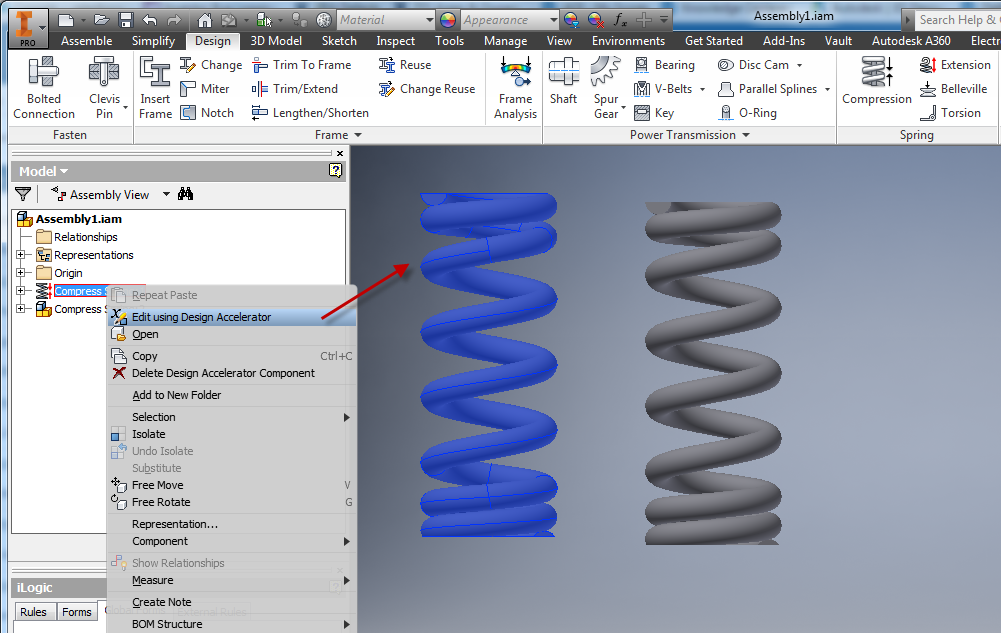
Work with over 20 integrated calculators and generators such as bolted connections, splines, gears and bearings to design with the correct specification.

PCB Interoperability

Import printed circuit boards into your assembly designs with IDF translators or import Fusion 360 PCB designs. 
Play Video

Technical Presentations

Create technical documentation and animations.

Dynamic Simulation

Analyse motion, speed and acceleration. 
Design Consulting Autodesk Inventor Professional Stress Analysis Moving at the Speed of Business

Stress Analysis

Run static and modal (natural frequency modes, including rigid body movements) simulation studies.

Extended Features

Increase productivity with these features found in the PDM Collection and Vault.

Integrated 5 Axis CAM and Nesting

Get Inventor CAM and Nesting tools with the Product Design & Manufacturing Collection.

Data Management 

See how much time and money your company can save working within a secure, collaborative data management system.

Inventor and AutoCAD Workflows

Use the right tool for the right job. Reference AutoCAD 2D CAD data into Inventor designs and drawings and detail Inventor models in AutoCAD.

Inventor and Fusion Workflows

Use Fusion 360 generative design studies to explore design alternatives and optimise product preformance or cost.

Exceptional Value

Buy Autodesk Inventor Professional on an Annual or 3 Year Subscription. Get more value from the Product Design & Manufacturing Collection. All prices quoted here are Ex. GST.

INVENTOR PROFESSIONAL

GET 3YRS AND SAVE!
$ 7,899 3 Year Subscription
  • Discounted
  • Price locked in for 3 Years
  • Includes updates and support
Popular

Compare

Compare the Product Design & Manufacturing Collection to other products such as Inventor Professional, AutoCAD Inventor LT suite and Inventor Professional LT.

  • PDM Collection
  • Inventor Professional
  • AutoCAD Inventor LT Suite
  • Inventor LT
PDM CollectionInventor ProfessionalAutoCAD Inventor LT SuiteInventor LT
$3,825
/year Ex. GST
$2,930
/year Ex. GST
$730
/year Ex. GST
$590
/year Ex. GST
3D Parametric Part Modelling
B-REP surfacing, solid body and multi-body part modelling
Direct Editing
Direct editing (push-pull) part modelling environment
Freeform Modelling
NURBS with T-Splines part modelling environment
Plastic Part Design
Mold and die modelling environment
Local Rendering
Ray-trace rendering on your PC
2D Design
2D design functionality in AutoCAD or AutoCAD LT
2D Drafting
2D views, annotations, leaders, etc.
3D Parametric Assembly Modelling
Place multiple parts in an assembly file and use constraints and joints to assemble
Weldments
Weldment assembly environment used with frame generator to model structural frames
Sheet Metal Modelling
Tools for sheet metal design, flat patterns and 2D symbols and annotations
Electrical Cable and Harnessing
Tools tools to route electrical cables, harnesses and detail nailboards
Electrical Schematics
Design electrical control systems and switchboards with reports such as from/to and wire lists
EMX Project
Synch between AutoCAD Electrical schematicsand Inventor Professional cable harnesses
Tube and Piping
Tools to design flexible hose, tubes and pipes
Design Automation
Simplified code and forms to automate 3D model, drawings and connect to Excel
Content Centre Library
Customisable library of parts such as steel profiles and fasteners
Draft Analysis
Analyse drafts
Clash and interference detection
Detect clashes or interferences between parts in assemblies
Material cost/impact
Ability to select a material based on the environmental/cost impact
BIM Interoperability
Prepare models and export to RFA, adsk or IFC
Point Clouds
Import point clouds via Recap
Point Cloud Pre-Processing
Tools found in Recap Pro
Bill of Materials
Create bills of materials and tabvles from parts and assemblies
AnyCAD
Associative import of CAD parts and assembly files
Application Programming Interface (API)
Install plug-ins, create plug-ins, macros and run Dynamo scripts
Linear FEA
Linear and Dynamic FEA simulation studies
Non-Linear FEA
FEA tools in Inventor Nastran
CAM
Features found in Inventor CAM and HSMWorks
Nesting
Nesting tools in Inventor Nesting
Tolerance Analysis
Features found in Inventor Tolerance Analysis
Architecture Design
Features found in AutoCAD specialised toolsets
GIS Mapping
Features found in AutoCAD specialised toolsets
Raster Tools
Features found in AutoCAD specialised toolsets
Plant Design
Features found in AutoCAD specialised toolsets
P&ID Schematics
Features found in AutoCAD specialised toolsets
Clash Detection
Features found in Navisworks Manage
5D Scheduling
Features found in Navisworks Manage
Project Review and Coordination
Features found in Navisworks Manage
Production Rendering and Animation
Features found in 3ds Max
Process Analysis
Bottleneck simulation and reporting for factory and assembly line layouts
Synch AutoCAD and Inventor Professional
2D/3D Factory Assets to synch AutoCAD 2D layouts with Inventor Professional 3D models
Buy NowBuy NowBuy NowBuy Now

Inventor Professional Add-Ons

Check out these programs and plug-ins to boost productivity even further.
Enterprise data management.
Additive manufacturing simulation and optimisation.
Cloud Collaboration with Fusion 360 Team Participant
Machine tool probing software for on machine verification and inspection.
Computational Fluid Dynamic software to simulate loads, air and fluid flows.
Injection mold simulation software

Contact Us

If you would to discuss Autodesk Inventor Professional, please contact us by calling on 1800 490 514, by filling out the form or clicking the live chat in the bottom right-hand corner.

Contact Us Moving at the Speed of Business

VIEW MORE

Arnold

Autodesk Arnold 2019 Logo 1280x720 1 2 Moving at the Speed of Business

Arnold Overview Table of Contents Included Software Revit Civil 3D AutoCAD InfraWorks Navisworks Manage ReCap Pro Compare Plug-ins Related Posts Works with   Contact Us If you would more information, please contact us by calling on 1800 490 514, by filling out the form or clicking the live chat in the bottom right-hand corner.

VIEW MORE

Alias

alias Moving at the Speed of Business

Alias

Overview

Table of Contents

Compare

Plug-ins

Related Posts

Works with


Contact Us

If you would more information, please contact us by calling on 1800 490 514, by filling out the form or clicking the live chat in the bottom right-hand corner.

VIEW MORE

AutoCAD with Specialised Toolsets

Autodesk AutoCAD including specialized toolsets

Autodesk AutoCAD with Specialised Toolsets

The most diverse range of CAD design and drafting tools based on the most popular CAD platform.

Buy AutoCAD Annual Subscription

Call for Price

Includes GST

Premium Technical Support

Free Onboarding Session

30 Day Money Back Guarantee

Credit Cards Accepted

AutoCAD Architecture
Architectural design and drafting tools.
Learn More
AutoCAD Mechanical
Mechanical design and drafting tools with library and machinery calculators.
Learn More
AutoCAD Electrical
Electrical schematic and panel layout design and drafting
Learn More
AutoCAD Map 3D
GIS mapping and design tools
Learn More
AutoCAD MEP
Design MEP systems with over 10,000 objects and detail construction drawings
Learn More
AutoCAD Plant 3D
3D Plant and P&ID schematic design and drafting
Learn More
AutoCAD Raster Design
Raster to vector conversion tools
Learn More
Estore
Get AutoCAD with Specialised Toolsets on Subscription
Buy Now
Previous slide
Next slide

Overview

What is AutoCAD and the Specialised Toolsets?

Compare

Compare AutoCAD to AutoCAD LT and Industry Collections.

Features & Toolsets

See what the Specialised Toolsets are.

Add-ons

Programs and plug-ins to boost productivity.

Pricing

Subscription pricing comparisons.

Blog

Learn about products, workflows and related products.

Overview

Autodesk AutoCAD with Speciliased Toolsets is a compilation of software titles for general design, architecture, mechanical, electrical, plant design, MEP and GIS.

  • Get AutoCAD for PC, Mac, web and mobile.

  • Leading 2D/3D design and drafting tools.

  • A complete set of design tools for construction and manufaturing.

Get more out of AutoCAD with specialised toolsets

With industry specific toolsets, AutoCAD extends its functionality and productivity with automated workflows, block, libraries and tables such as architectural floorplans, design pipe runs, ducting and circuit layouts, generate specific schedules, layers, lists and tables.

Work anywhere anytime

Use cloud storage, web and mobile apps to be always connected to your projects, designs, clients and team members.

Share, view, design, draft and annotate on any device, anywhere, anytime.

Features

Check out what’s new with AutoCAD, extended workflows, 2D drafting and 3D modelling capabilities.

Compare versions of drawings.

Compare XREF versions.

Blocks Palette enhancements.

Experience faster performance with improved save and install times and multicore CPU support for orbit, pan and zoom.

Open, view, edit and create drawings on any desktop, web or mobile device.

Access any DWG file with Autodesk cloud storage or through other leading cloud storage providers.

Quick Measure by hovering over with the mouse.

Compare two versions of a drawing inside the current window.

Easily purge and remove multiple objects simulataneously.

Create single text objects from single or multi-line text.

Automatic dimension creation with preview capabilities.

Create leaders from text or blocks with comprehensive formatting tools.

Create and edit centrelines and centre marks that are referenced to associated objects and move collectively  

Create data tables with rows and columns for data, attributes, symbols and hyperlinks. Apply formulas and link spreadsheets to tables.

Collaborate and mark-up drawings with revision clouds.

Name views in layouts and easily find them.

Setup templates by nominating sheet size, placing title blocks and place multiple views to annotate.

Use intelligent fields in text objects that automatically update when field values are modified.

Design Consulting Autodesk AutoCAD Link Excel 1 Moving at the Speed of Business

Live link Excel spreadsheets with AutoCAD drawing tables.

Design Consulting Autodesk AutoCAD Data Extraction Moving at the Speed of Business

Extract valuable meta data from objects, blocks, attributes and drawing information.

Design Consulting Autodesk AutoCAD Dynamic Blocks Moving at the Speed of Business

Use Dynamic blocks to create configurable blocks that automatically change shape or size based on a configuration or field modification.

Design Consulting Autodesk AutoCAD Arrays Moving at the Speed of Business

Create complex arrays and a patterns by rectangular or circular arrays or along a custom path.

Design Consulting Autodesk AutoCAD Parametrics Moving at the Speed of Business

Use parametric constraints to maintain relationships between drawing geometry such as coincident, perpendicular, tangent, parallel and concentric.

Design Consulting Autodesk AutoCAD Express Tools Moving at the Speed of Business

Leverage on over 85 express tool commands to automate tasks and boost productivity.

Toolsets

Use 2D/3D AutoCAD design and drafting functionality with specialised toolsets depending on your industry, project or application.

Select a Specialised Tool to Naviagate to

AutoCAD Architecture

Architectural design and drafting tools with over 8,000 intelligent objects and styles for building design.

AutoCAD Fundamentals Training Course

Create new building designs or work in renovation mode where objects are assigned as existing to better understand the differences between new and existing structures and objects.

Design Consulting AutoCAD Architecture Walls doors windows Moving at the Speed of Business

Tools to add, modify and remove walls, floors, ceiling, roofs, doors, windows and other intelligent objects.

Design Consulting AutoCAD Architecture detail components Moving at the Speed of Business

Detail components such as bolt heads, nails, beams, columns, framing members, CMU’s, connectors, etc. are inserted as blocks to produce detailed construction drawings.

AutoCAD Mechanical

Tools for mechanical engineering and a content centre library of over 700,000 components.

The Layer Manager (AMLAYERGROUP command) creates, deletes and renames layers and convert AutoCAD Layers to a Mechanical Layer.

Create hidden lines by specifying which layers overlap.

Use standard parts and features to produce fabrication and mechanical drawings with a content centre library of over 700,000 components.

Use in-built component generators and calculators for springs, shafts, gears, bearings, etc. to place mechanically accurate objects into drawings.

Insert and link Autodesk Inventor 3D CAD models into paper space and create mechanical and fabrication drawings.

Specific detailing and annotation tools for mechanic design and drafting.

Create a customised content centre library.

Preview geometrical results of commands such as fillets and chamfers before executing the command.

Create bills of materials and parts lists with item numbers and associate balloons in drawings.

AutoCAD Electrical

Electrical schematic design tools, intelligent symbols, tagging, panel layout design tools and reports such as from/to and wire lists.

AutoCAD Electrical Program Moving at the Speed of Business

Generate Bills of Material reports such as tallied, by installation/location, purchased, by tag, components, from/to, wire lists, connector plugs, PLC, terminal, cable reports and more.

Automatic numbering schemes for wires and tags for components.

Track in real-time parent/child relationships with contacts.

Create panel layout drawings with bi-directional link to electrical schematics.

Generate PLC modules, full PLC units, insert PLC I/O points as symbols and paramterically control designs via the PLC database.

Use the existing or create a catalogue of symbols, circuits, PLC, wires, connectors,location boxes, pneumatic, hydraulic and P&ID components and more.

AutoCAD Map 3D

Integrate GIS topology and map files with CAD designs for planning, analysis and data management for applications such as master planning, land use, corridor planning, optimisation, conceptual and preliiminary design, site planning and analysis, renovation and retrofit project planning.

AutoCAD Map 3D GIS Mapping software

Connect external spatial data sources such as databases or data stores such as Oracle, SQL Server, Autodesk SDF or ASRI SHP 

Combine multiple data sources such as geospatial features with AutoCAD and AutoCAD Map 3D drawings objects, raster images and attributes.

Work with multiple coordinate systems such as EPSG and Mentor with transform, rubber sheeting tools to precisely track coordinates and georeference your AutoCAD designs and data. 

Integrate geographic information system (GIS) data with AutoCAD MAP 3D CAD data. Maintain a DWG file, convert datasets to an external file or move them to a spatial database

Search, filter data, access and edit DWG datasets and base maps with multiple users concurrently.

View and edit drawing object attribute data. Use data tables to highlight data and specific map features.

Manage spatial data by using the Schema editor, add/delete schema features and properties, create data stores or connect to SDF files with Data Connect, export DWG data or export maps to DWG and bulk copy from one data store to another.

Theme and analyse data by colour coding by attributes, filters, contour maps to analyse 3D terrain, elevations, slope, buffer zones based on properties and overlay geospatial layers to compare data.

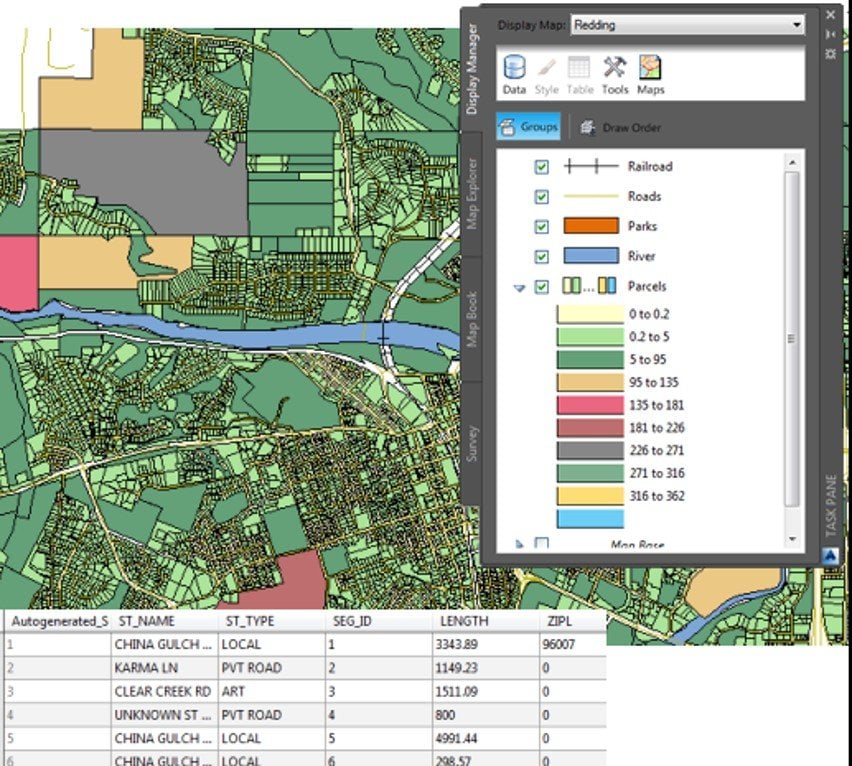
Style drawing objects, features layers and surfaces to change the appearance of your map using the Display Manager.

Create Industry Model Drawings that follow rules and standards Access advanced features such as class forms, reports and analysis tools

AutoCAD MEP

Design, drafting and document MEP systems for buildings using specific tools and libraries with over 10,000 intelligent objects for mechanical, electrical and plumbing professionals. Maintain consistency across the project with multiple views of the one design.

Place components and lines in P&ID drawings that have intelligent data linked to generates reports.

Improve the appearance of documentation.

With a comprehensive parametric library of plant, piping and structural equipment, you can layout and design new and existing plants that adhere to industry specifications.

Choose from a 1 line, 2 line or 3D ISO representation views.

Display or hide centrelines on ducts, fexible ducts and fittings. Extend centrelines on oval and round take offs.

Design Consulting Autodesk AutoCAD MEP Bill of Materials 1 Moving at the Speed of Business

Convert AutoCAD blocks to smart AutoCAD MEP blocks one by one or in batches.

AutoCAD Plant 3D

3D plant design and pipe routing tools and libraries with P&ID schematics, symbols and tags.

Place components such as nozzles and valves and lines in in P&ID drawings with annotations and tags and generate reports.

With a link between the design and ortho drawings, any changes made in the 3D model will be updated in piping orthographic drawings. 

Design new plant layouts or update existing conditions with plant design tools with a library of parametric equipment, structural with industry standard pipe specifications

Reference existing AutoCAD 3D models into Plant 3D.

Create isometric drawings, plans, sections, orthographic drawings and generate bills of materials.

Create complex pipe runs with intuitive tools to create tees, o-let branches, bends and add fittings.

AutoCAD Raster Design

Raster to Vector conversion tools and image clean up and manipulation for AutoCAD.

Edit and clean-up images with despeckle, bias, mirror and touch up tools with AutoCAD.

Manipulate raster entities using AutoCAD commands on raster regions and primitives and erase raster images, lines, arcs and cirlces.

Convert raster to vector with line and polyline conversion tools.

Exceptional Value

Each Specialised Toolset that is included in AutoCAD used to be at an additional cost for a similar price to AutoCAD.

If you need ore functionality consider an Industry Collection with even more design, analysis, documentation, collaboration and visualisation tools. 

AutoCAD

GET 3YRS AND SAVE!
$ 7,575 3 Year Subscription
  • Discounted
  • Price locked in for 3 Years
  • Includes updates and support
Popular

Compare

Compare the Media & Entertainment Collection to other products such as 3ds Max, Maya and Maya LT.

  • AutoCAD
  • AutoCAD LT
AutoCADAutoCAD LT
$Call for Price
/year Inc. GST
$
/year Inc. GST
2D Design
2D design, sketching and block tools with model space
2D Drafting
Place views from model space and annotate drawings with dimensions, leaders, symbols, hatching, etc,
Import PDF
Import and convert PDF's to AutoCAD vector
Link to Excel
Link design tables to Excel
Revision Clouds
Create revision clouds for collaboration
3D Modelling
Solid, surface and mesh objectsmodelling tools with model space
Express Tools
Over 80 LISP routines to automate tasks
Rendering
Render photo realistic models from 3D models
Cloud Rendering
Send render jobs to Autodesk cloud rendering service
Import point clouds
Import recap point cloud files
Basic rendering
Hypershade, visor, shaderFX, colour management, DX11, HLSL and CgFX support (Features may differ between 3ds Max and Maya)
Open API
Create or use custom plug-ins and Viewport 2.0 API
Specialised Toolsets
AutoCAD Architecture, Electrical, MAP 3D, MEP, Plant 3D and Raster Design
Buy NowBuy Now

AutoCAD Add-Ons

Check out these programs and plug-ins to boost productivity even further.

Contact Us

If you would learn more about Autodesk AutoCAD software, please contact us by calling on 1800 490 514, by filling out the form or clicking the live chat in the bottom right-hand corner.

Includes GST

VIEW MORE

Architecture Engineering and Construction Collection

Autodesk Architecture Engineering and Construction Collection - Autodesk AEC Collection

Autodesk Architecture Engineering and Construction Collection

A complete set of BIM tools for the design, analysis, visualisation and documentation of buildings and infrastructure designs and projects.
Revit
Cutting edge BIM software for Architectural, Structural, Mechanical and Electrical 3D modelling, documentation and drafting.
Learn More
AutoCAD
Specialised toolsets for Architecture, Mechanical, Plant, Electrical,GIS design and drafting.
Learn More
Civil 3D
Civil engineering design and analysis
Learn More
Infraworks
Civil infrastructure concept and analysis
Learn More
Advance Steel
Parametric structural steel design and drafting
Learn More
Navisworks Manage
Model coordination, project review, 2D/3D quantity take off, 5D scheduling and clash detection
Learn More
Estore
Get the Architecture Engineering and Construction Collection on an Annual Subscription
Buy Now
Previous slide
Next slide

Overview

What is the Architecture Engineering and Construction Collection?

Compare

Compare the AEC Collection to Revit and Revit LT.

Included Software

See what software is included in the AEC Industry Collection.

Add-ons

Programs and plug-ins to boost productivity.

Pricing

Subscription pricing and comparison to standalone subscriptions.

Blog

Learn about products, workflows and related products.

Overview

The Autodesk AEC Industry Collection is a compilation of software titles for the architecture, engineering, construction and infrastructure industries which give the ability to 3D model, design, visualise, animate, coordinate, simulate, document and draft designs in 2D.

Create high-quality, detailed designs for building and infrastructure projects.
Optimise designs with analysis, generative design, visualisation and simulation tools.
Improve predictability in the field by coordinating and simulating projects and schedules.

The Autodesk AEC Industry Collection is a compilation of software titles for the architecture, engineering, construction and insfrastructure industries which give the ability to 3D model, design, visualise, animate, coordinate, simulate, document and draft designs in 2D.

  • Create high-quality, detailed designs for building and infrastructure projects.
  • Optimise designs with analysis, generative design, visualisation and simulation tools.
  • Improve predictability in the field by coordinating and simulating projects and schedules.

Architectural BIM Workflows

Combine Revit and Insight to improve environmental performance to guide you towards better outcomes using robust analytical tools.
Model in Revit and visualise analysis in Insight such as indicators, benchmark, ranges and specifications on factors such as infiltration, operating schedule, building orientation, lighting efficiency, HVAC, plug load efficiency, payback limit, surface coverage, panel efficiency and effect on construction materials.
Once you have viewed results, you can make design changes in Revit to optimise the building performance using comparison scenarios and viewing the results through the analytical model and produce a calculation summary report to validate design choices.


Infrastructure BIM Workflows

Combine Revit, Civil 3D and Infraworks for bridge analysis and design. Use Civil 3D road geometry to create the initial bridge and develops the design further in Infraworks using parametric rules to change the characteristics of the bridge by individually changing parameters or automate by connecting parameters to a spreadsheet to layout the bridge. Run integrated analysis and design tools to provide feedback during the optioneering phase.
 
Any changes in Civil 3D can be updated in Infraworks thereby providing connected design tools. The bridge structure can be publish to Revit and design work can continue concurrently using 3D structural design tools and 2D documentation.

Generative Design

Create generative design studies to quickly view alternate designs

Structral Design and Analysis Workflows

Combine Revit, Advance Steel and Robot to design, engineer and fabricate structural projects.

3D Scanning BIM Workflows

Pre-process point cloud data for Revit and import 3D scans and work in a hybrid reality capture BIM environment.

Design Automation Workflows

Automate routine tasks that normally take hours into minutes by running Dynamo scripts with applications such as Revit, Civil 3D, FormIT and Advance Steel .

MEP Fabrication Workflows

Connect Revit and CADmep to reduce duplication in designs allowing fabricators to create production designs and documentaion..

Included Software

The most comprehensive selection of cutting-edge BIM and CAD design, visualisation and analysis software and cloud tools comes within the AEC Collection.

Revit

Architectural, structural, mechanical and electrical 3D modelling and drafting BIM software.

Civil 3D

Civil engineering design and construction documentation software.

AutoCAD

2D/3D design and drafting software with specialised toolsets for AEC, plant design, GIS and more.

Infraworks

Conceptual design, visualisation and analysis software for civil infrastructure.

Navisworks Manage

Project coordination, data aggregation, 5D scheduling, quantification, simulation and visualisation software.

Advance Steel

Structural steel design and detailing software that works with beamline machines.

Recap Pro

Reality capture, photogrammetry and 3D scanning point cloud software.

Insight

Building energy analysis software.

Formit Pro

3D sketching and design and energy analysis software with Revit and Dynamo interoperability.

Dynamo Studio

Visual programming design automation software for Revit, Formit and Advance Steel.

Robot Structural Analysis Professional

Non-Linear structural analysis for Revit and Advance Steel.

3ds Max

3D modelling, rendering, animation and simulation software.

Vehicle Tracking

Swept path analysis software.

Fabrication CADmep

Cloud storage and collaboration for CAD.

Autodesk Rendering

Cloud based rendering for Revit, 3ds Max, Navisworks and AutoCAD.

Autodesk Drive

Cloud storage and collaboration for CAD.

Exceptional Value

Compare buying the AEC Collection to buying each title separately. If you need more than one application, getting an Industry Collection is the best value choice. Please note that all prices quoted below exclude GST.

Compare

Compare the AEC Collection to other products such as Revit, AutoCAD Revit LT suite and Revit LT.

  • AEC Collection
  • Revit
  • AutoCAD Revit LT Suite
  • Revit LT
AEC CollectionRevitAutoCAD Revit LT SuiteRevit LT
$Call for Price
/year Inc. GST
$Call for Price
/year Inc. GST
$Call for Price
/year Inc. GST
$Call for Price
/year Inc. GST
3D Modelling
3D CAD Modelling functionality in Revit
2D Design
2D design functionality in AutoCAD or AutoCAD LT
2D Drafting
2D views, annotations, leaders, etc.
Architectural Modelling
Tools to model architectural elements such as floors, walls, doors, etc.
Structural Modelling
Tools to model structural steel and concrete elements
LimitedLimited
MEP Modelling
Tools for mechanical, electrical and piping elements
Parts and Assemblies
Ability to break up designs in Revit into parts and assemblies
Solar Studies
Conduct solar studies in Revit
Global Parameters
Drive other parameters in Revit
Conceptual Massing
Fast way to model 3D mass objects
Local Rendering
Ray-trace rendering on your PC
Cloud Based Rendering
Off-load rendering to the cloud. High resolution renders cost cloud credits.
Analysis
Area, analytic model, structural loads, boundary conditions, heating and cooling loads, massing studies
Schedules
Create schedule and material take-off reports
Collaboration
Interference checks, copy/monitor, worksharing, share coordinates among projects and Revit server
Copy/paste elements in linked Revit files
Ability to copy/paste elements between Revit files that are linked into the Revit project.
Linked Revit file visibility customisation
Control the visibility ofelements of Revit projects that have been linked
Point Clouds
Import point clouds via Recap
Standard Revit Exporters
Export to DWG, DGN, DWF, Images, FBX, NWC and reports
Additional Revit Exporters
SAT, ADSK, gbXML, ODBC, family types
Application Programming Interface (API)
Install plug-ins, create plug-ins, macros and run Dynamo scripts
Energy, lighting, solar analysis
Features found in Insight
Non-Linear Structural Analysis
FEA tools in Robot
Civil Infrastructure Design
Tools in Civil 3D and Infraworks
Structural Steel Detailing
Features found in Advance Steel
Electrical Schematics
Features found in AutoCAD specialised toolsets
GIS Mapping
Features found in AutoCAD specialised toolsets
Raster Tools
Features found in AutoCAD specialised toolsets
Plant Design
Features found in AutoCAD specialised toolsets
P&ID Schematics
Features found in AutoCAD specialised toolsets
Clash Detection
Features found in Navisworks Manage
5D Scheduling
Features found in Navisworks Manage
Project Review and Coordination
Features found in Navisworks Manage
Production Rendering and Animation
Features found in 3ds Max
Bridge loading, analysis and code checking
Features found in Structural Bridge Design
Generative Design
Explore design iterations generated from a study based on goals, constraints and inputs
Buy NowBuy NowBuy NowBuy Now

AEC Collection Add-Ons

Check out these programs and plug-ins to boost productivity even further.
Cloud based worksharing, collaboration and model comparison. Includes BIM 360 Docs.
Revit Utilities Logo Moving at the Speed of Business
Revit enhancements for BIM management, renumbering, Excel, sheets, MEP, parameters and more.
Cloud based construction management with document control, collaboration.
Civil 3D Utilities Logo 1 Moving at the Speed of Business
Civil 3D enhancements for piping, polylines, maps, points and more.
Computational Fluid Dynamic software to simulate wind loads, air and fluid flows.
IMAGINiT Clarity Logo Moving at the Speed of Business
Revit Automation, Analytics
and Access.

Contact Us

If you would learn more about Autodesk software, please contact us by calling on 1800 490 514, by filling out the form or clicking the live chat in the bottom right-hand corner.

VIEW MORE

Automate Datasheets from Revit models

IMAGINiT Clarity Logo Moving at the Speed of Business

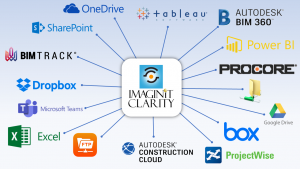
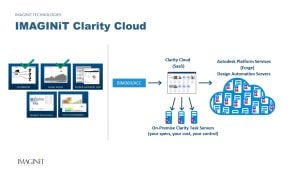
Imaginit Clarity saves hundreds of hours by automatically creating datasheets, schedules and reports by directly pulling drawings and parameters from the Revit model to ensure datasheets are always up to date and accurate. If you need to create room, furniture or equipment datasheets, schedules or reports, you know how manually intensive the process of creating datasheets is, how much…

VIEW MORE

Revit and Inventor – Prefabrication construction workflows

Revit Inventor Logo Moving at the Speed of Business

With Construction and Manufacturing converging, the collaboration in design between Architects, Builders, Manufacturers and Fabricators has become more important than ever. In this article we explore the link between Autodesk Revit and Inventor to show how models and drawings can from the two systems can work together. In an Autodesk BIM environment, typically the architectural, structural and MEP design…

VIEW MORE

3D Rack Configurator

rack Moving at the Speed of Business

Want to automate 3D configurable models, 2D drawings and a bill of materials? Check out this rack configurator with 45 options using Autodesk Inventor which automates the 3D model and Bill of materials, right down to the nuts and bolts. In this video we drop in multiple racks and layout out a factory with 57,000 parts using the tools in the Autodesk…

VIEW MORE

Autodesk Vault 2020

1 Moving at the Speed of Business

Autodesk Vault 2020 Vault 2020 features an enhanced user experience, wider administrative controls, and extended project collaboration along with design re-use capabilities and optimised documentation, which helps to focus on value-added work and increased productivity. Below are the details on new features Copy Design Provides consistence & aligned user interface with simplified user experience and powerful usability enhancements and…

VIEW MORE

What’s New in Autodesk Inventor 2017

inventor 2017 badge 2048px Moving at the Speed of Business

It’s that time of year again to see what’s new in Autodesk’s Inventor 2017.Another pretty good release with new technology that are in line with where things are heading, a focus on cloud collaboration and enhancements that users have been requesting. Below is a full list of what’s new, but here’s the top new things that I like and a…

VIEW MORE

Finally… Revit for Mac

frame revit work 450x300 Moving at the Speed of Business

The wait is over all you Mac and Revit users. No more Bootcamp, Parallels or switching between a PC and Mac, well, yes, but no. Autodesk don’t have a Revit for Mac version but there is an application called Frame that it can run through and Autodesk have certified it for Revit and AutoCAD. “Frame: Run any software in a browser”…

VIEW MORE

SeeControl – The no coding IoT Platform

how it works make sense diagram ASDKSC Moving at the Speed of Business

Autodesk has released their new IoT app which was acquired mid-2015. With products evolving to more more complex and connected, manufacturers are under pressure to provide instant information which also opens exciting opportunities for innovation, new markets and providing a unique customer experience. Autodesk SeeControl is an IoT app that connects your products to the cloud, so it can give…

VIEW MORE

Autodesk Inventor 2017 News

inventor 2017 badge 2048px Moving at the Speed of Business

If you have not already heard, Autodesk are moving to a subscription only platform. While this change is new for some, it is exciting for those who want to be on the bleeding edge of technology and need flexible licencing. Probably the biggest benefit I see is how much development and new features are being put into the product….

VIEW MORE

How Nissan Motorsport utilise Autodesk Technology

nissanmotot Moving at the Speed of Business

In 2012, Kelly Racing started up Nissan Motorsport for the V8 Supercar championship. I had the pleasure of visiting the site in Braeside today with Autodesk and taking a tour with Craig Spencer, who is General Manager of Technical And Engineering Operations. Craig has a wealth of experience most recently moving from the Mercedez-Benz Formula 1 team to join Kelly Racing….

VIEW MORE

What’s New in Autodesk Inventor 2016

new rendering engine Moving at the Speed of Business

One of the biggest and best releases in CAD let alone Inventor. When Inventor 2015 was released I thought it was one the No.1 CAD system on the planet, Inventor 2016 cements it. Inventor blows away anything else on the market, add to that you get it in a Suite of other best of breed products and nothing else comes…

VIEW MORE

What is #TheFutureofMakingThings ?

inventor 2015 ray tracing Moving at the Speed of Business

Autodesk has launched The Future of Making Things. A vision of how they see future human and business interaction with technology when it comes to engineering, design, analysis and collaboration. At the Autodesk University Keynote address in December, 2014,  Jeff Kowalski, Autodesk SVP and Chief Technology Officer, discussed how Autodesk is looking at technology and design through the lens of…

VIEW MORE

Australian Manufacturing and Government Policy

abbott Moving at the Speed of Business

It’s been almost a year since the Coalition came to power, so let’s review what actions and policies have affected Australian Manufacturing. During the 2013 election campaign, the Coalitions pointed out 5 pillars of the economy, one being Manufacturing. Ian MacFarlane, was sworn in as the Minister for Industry on September 18th, 2013. About 4 months before that, Ford announced they were shutting shop…

VIEW MORE

Nastran In-CAD 2015 for Solidworks

nastran Moving at the Speed of Business

Nastran In-CAD 2015 is now shipping for an integrated environment for Soldiworks. With a great reputation in the industry the Nastran solver does FEA linear and non-linear analysis. Adding to the Moldflow, Algor & CFDesign Line Up, Autodesk is now shipping Nastran 2015 and Nastran In-CAD 2015 for an integrated environment for Soldiworks and Inventor. The solver is also…

VIEW MORE

Autodesk Releases Nastran 2015 and Nastran In-CAD 2015

nastran Moving at the Speed of Business

Adding to the Moldflow, Algor & CFDesign Line Up, Autodesk is now shipping Nastran 2015 and Nastran In-CAD 2015 for an integrated environment for Soldiworks and Inventor. With a great reputation in the industry the Nastran solver does FEA linear and non-linear analysis. The solver is also integrated into Autodesks Simulation Mechanical (Local Machine) and Simulation Flex which is…

VIEW MORE

Solidworks Technical Documentation Software

publisher 2013 v 2015 Moving at the Speed of Business

Technical Documentation Software with Multi-CAD Associativity If you work with Solidworks and other CAD files that constantly change and publish to MS Office, Adobe, Video, Social Media and Mobile Apps, then take a good look at Autodesk’s 2015 Release of Inventor Publisher. The top enhancements from the previous release has been on associativity with all major CAD formats (aka Model Refresh), Adding Custom…

VIEW MORE

What’s New in Inventor Publisher 2015

publisher 2013 v 2015 Moving at the Speed of Business

Technical Documentation Software with Multi-CAD Associativity If you work with different CAD files that constantly change and publish to MS Office, Adobe, Video, Social Media and Mobile Apps, then take a good look at Autodesk’s 2015 Release of Inventor Publisher. The top enhancements from the previous release has been on associativity with all major CAD formats (aka Model Refresh), Adding Custom Properties, improvements…

VIEW MORE

What Does The Carbon Tax Repeal Bill Mean for Manufacturing?

wind power20 8262013 Moving at the Speed of Business

The Carbon Tax has been repealed in the Federal Senate, so with the tax gone, marked at about $24 per tonne of carbon, how much will Australian businesses and manufacturers save and what will happen to the renewable energy sector. Most larger companies would have entered into electricity contracts that were either carbon inclusive or carbon exclusive. Many retailers were offering very attractive carbon…

VIEW MORE

Autodesk Releases Advance Steel for Structural Detailing

adv steel Moving at the Speed of Business

Parametric Connections, NC File Support, Revit & Robot Structures Interoperability plus more. Built on the familar AutoCAD, Autodesk Advanced Steel brings a lot of features and functionality missing in Autodesk’s portfolio of design products. Anyone who had experience with AutoCAD Structural detailing knew of it’s limitations, so to have this product released is a step in the right direction. When you…

VIEW MORE

Mockup 360 Now in Product Design Suite 2015

mockup 360 Moving at the Speed of Business

Open Collaboration Services Added to the Suite’s Subscription Services. If real-time open collaboration (regardless of CAD tool), large scale 3D visualisation, clash detection analysis and project management ticks boxes as benefits in your design workflows, then take a look at Mockup 360. Product Design Suite Services are cloud based services such as Autodesk 360 (Document Hosting, Sharing, Editing & Collaboration), Optimisation Studies for Inventor…

VIEW MORE

Autodesk Inventor 2015 – Sheet Metal Enhancements

Autodesk Inventor Professional 3D mechanical CAD software

With sheet metal design being an integral part of many Inventor customers, the new features and enhancements are always taken with great interest, so here’s a video I put together: So What’s New in Sheet Metal for Inventor 2015 Rename End Of Part (EOP) to End Of Folded (EOF) for sheet metal parts Enhanced orientation control in…

VIEW MORE

What’s New in Autodesk Inventor 2015

gickr com 5542d49a 9ad1 a7d4 bdae 3533832576c1 Moving at the Speed of Business

Hybrid Parametric Direct Editing, N.U.R.B.S with T-Splines and more… Inventor 2015 is one of the best releases yet, unlike any other CAD tool on the market today because it not only delivers enhancements to existing tools and UI but adds new technology that makes this product so unique. There’s 2 big additions and many enhancements, so in this article…

VIEW MORE

Leveraging on Engineering to Drive Sales and Increase Profitability

autocad mechcanical Moving at the Speed of Business

Use Your Existing Engineering & Design Investment to Make Money & Save Time. Engineering for some companies can be seen as a cost, requiring resources and energy to engineer, design, research and develop. Using the right tools can reduce design cycles, errors and time and also create better products that will generate more profit but what about using those…

VIEW MORE

Automate 3D CAD Design with Autodesk Inventor’s iLogic

ilogic Moving at the Speed of Business

Conveyor Pulleys Australia Improves Productivity in 3D Modelling, Quoting & Ordering by at least 50%. When CPA moved their designs from AutoCAD to Inventor, it’s fair to say they increased productivity by around 50%, but by automating with Inventor using its iLogic module, they reduced engineering design, quoting and ordering processes by at least another 50% and what used…

VIEW MORE

What Are The Best Tools For Factory Design and Management? Pt. 2

factory design suite option b Moving at the Speed of Business

The Foundation of Factory Design Suite Part 1 summarised the challenges and some of the tools used in designing and managing a Factory/Facility. This part focuses on Autodesk’s solution that addresses these challenges and subsequent posts will cover working with existing layouts, creating new layouts, analysis (process analysis, machine utilisation & energy consumption), visualisation and linking Factory Design Suite with…

VIEW MORE

Has Australia Turned its Back on Manufacturing?

Companies Offshoring, No Auto Makers and Government Shifting Focus to Other Industries. Prime Minister, Tony Abbott had a vision coming into the election of 5 strong pillars, one of them being manufacturing. I’d like to know his opinion of this pillar as the mother of all manufacturing sectors has announced unanimously that it doesn’t make business sense to manufacture…

VIEW MORE

Going, Going, Gone…

Toyota, Australia’s ‘last’ Automaker announces it will pull up stumps in 2017. In May, 2013 Ford announced its plans to offshore their manufacturing, then in December, Holden announced similar plans and now Toyota completes the hat trick in under 10 months, the last of the Automakers have all announced they will be closing their manufacturing plants citing similar reasons,…

VIEW MORE

What Are The Best Tools For Factory Design & Management?

A Way To Address Factory Layouts, Engineering, Sales, Lean Manufacturing, Made to Order, Scheduling & Production Planning Challenges. The design and management of a factory involves many tools and stakeholders. Engineers can design the facilities layout with architectural structures, conveyors, materials handling,  process equipment, safety equipment, office furniture, storage, building utilities (MEP), robots, spray booths, pits, platforms freezers, forklifts and humans,…

VIEW MORE

Victorian Government Shifts Focus To Defence

With $27B Worth of Defence Contracts Up For Grabs, Is the Victorian Government Giving Up On Manufacturing? As Car Manufacturing leaves our state over he next few years and SPCA’s considering a similar decision, the Victorian Government has signalled towards defence as their focus for manufacturing.  Defence is lucrative and not subject to the same market forces as food…

VIEW MORE

How AutoCAD Products Work With Inventor

Autodesk Inventor Professional 3D mechanical CAD software

Interoperability, Associativity, Synch and Exchange Explained. With currently 13 AutoCAD Branded products available, how do they work with Inventor and to what capacity? With all that legacy AutoCAD data out there and users still engineering design on various AutoCAD Products, working with DWG is an important issue and using Autodesk products make it easier. All those time saving features…

VIEW MORE

Australian Manufacturing is Offshoring When U.S Companies are Reshoring

What is driving the reshoring trend in the U.S. when Australian manufacturers are moving their manufacturing overseas?    With Chinese wages rising 15% per annum and the cost of transportation, the reasons are stacking up for U.S. companies to bring their manufacturing back .home. A shorter supply chain, being closer to their customers and retaining their IP are other…

VIEW MORE

Autodesk Releases Flow Design

flow design Moving at the Speed of Business

Wind Tunnel Simulator Available For Sale On Estore. Autodesk has released Flow Design which is a virtual wind tunnel simulator built on the Neutron Platform for mechanical and architectural applications that runs on PC or Mac. The Australian Estore site lists it for $35 per month or $200 annually. There’s an Add-in for Inventor and Revit but the standalone…

VIEW MORE

Productivity Commission’s Preliminary Findings on Auto Industry

Report on Australia’s Automotive Industry Examines Global Context & Trends. With Holden announcing their departure soon after Ford, this report seems a little pointless now, with Toyota being the only player (Oh, What a Feeling!), but it does highlight what has shaped the Auto landscaped in Australia. Some things we knew already, like energy, labour and the dollar are…

VIEW MORE

Who Gives a Frack?

Coal Seam Gas said to Benefit Manufacturing in Victoria by Lowering Gas Prices. There’s a lot of health concerns about CSG affecting water tables but with an abundance of resources, energy prices being so high, big players lobbying and the need to create jobs can you blame people for wanting the industry in Victoria. The Victorian government have delayed…

VIEW MORE

Autodesk Acquires Circuits.io for PCB Design and Manufacturing

Autodesk strengthens it’s web-based 3D presence and hints towards 3D Printing market. Joining the 123D App family is Circuits.io a web-based and connected community for designing and simulating electronic circuits and will now be branded Autodesk 123D Circuits. Not only can you do PCB design, you can order multi-layer PCB’s from the website too. Other features are a breadboard…

VIEW MORE

The Parametric Human Project

3D Modelling Nuts & Bolts with Bones & Tendons. Anyone have a 3D Model of a parametric biomechanical human body? No! Autodesk Research’s Digital Ergonomics Divisions focus is on creating products that involve human interaction and having an advanced biomechanical human model can help make these better products better because currently testing these products against known human fatos is…

VIEW MORE

1.2m Titanium Part from 3D Printer Sets New Benchmark

Get larger stronger parts produced quicker at a lower cost…. Something Australian Manufacturing needs to stay competitive. It took 37 hours to print the 1.2m spar section (used to form an aircraft wing) using a WAAM process; Wire and Arc Additive Manufacture and is part of a joint research project between BAE Systems and Cranfield University. Check out the…

VIEW MORE

Autodesk Clean Tech Program: Sustainable Designs for Tomorrow

Get $150,000 of software for $50, Workshops to Learn how to do sustainable design & engineering and understand key concepts, Sustainable business practices and Nonprofit donated software are some of the offerings Autodesk provide under their Clean Tech Program being driven by the design-led revolution. Clean Tech Innovators can apply for the $150k Clean Tech Grant Here and get Software for Digital…

VIEW MORE

Mitsubishi, Ford and Now Holden, So What About Toyota?

Future Looks Uncertain as Federal Court Rules Against Toyota Vote. Today, employees at Toyota Australia were to vote to reduce working conditions in an effort to save the company $17 million, but in a turn of events, the Federal Court has ruled against the vote, with the judge saying it breaches the original 2011 agreement and also the Fair Work…

VIEW MORE

Synching AutoCAD and Inventor with Factory Design Suite

When 2D isn’t Enough but 3D is Too Complicated – Use the Right Tool for the Right Job at the Right Time. Associativity between Autodesk’s AutoCAD and Inventor has always been an enhancement request. A couple years ago, Autodesk released Associativity between AutoCAD and Inventor where you could detail your 3D Inventor models with the power of AutoCAD and…

VIEW MORE