Comprehensive Comparison of BIM Collaborate and BIM Collaborate Pro

BIM Collaborate Pro

Comprehensive Comparison of BIM Collaborate and BIM Collaborate Pro
BIM Collaborate Pro

Building Information Modeling (BIM) has revolutionised the architecture, engineering, and construction (AEC) industries by fostering enhanced collaboration and coordination among project stakeholders. Autodesk, a leader in BIM solutions, offers two significant tools: BIM Collaborate (BC) and BIM Collaborate Pro (BCP). Although both platforms aim to enhance project collaboration, they cater to distinct needs and offer varied functionalities. This comprehensive comparison explores the features, benefits, and use cases of these two platforms to help you determine which is best suited for your needs.

What is BIM Collaborate?

BC is a cloud-based platform available with Autodesk Construction Cloud that is tailored to streamline document management, design coordination, and project administration. It centralises project information, allowing teams to collaborate seamlessly from any location. Key features include automated clash detection, design review tools, and advanced analytics, making it ideal for teams seeking robust collaboration without the need for real-time co-authoring.

What is BIM Collaborate Pro?

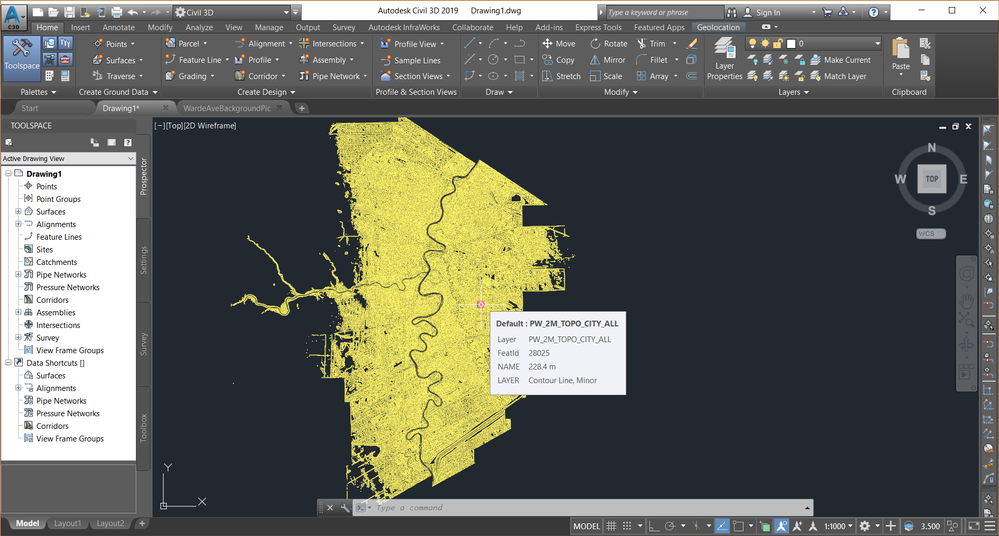
BCP builds on the capabilities of BIM Collaborate by incorporating real-time co-authoring and advanced collaboration tools, specifically designed for Autodesk software such as Revit, Civil 3D, and Plant 3D. This platform is geared towards larger teams and complex projects that demand simultaneous collaboration on models, enabling multiple users to work on the same design file concurrently.

Key Differences Between BIM Collaborate and BIM Collaborate Pro
Feature
BIM Collaborate
BIM Collaborate Pro
Cloud-based Document Management
Yes
Yes
Automated Clash Detection
Yes
Yes
Project Administration
Yes
Yes
Advanced Analytics
Yes
Yes
Design Review and Coordination
Yes
Yes
Robust Access Controls
Yes
Yes
Democratized Access to Design Data
Yes
Yes
Revit Issues Add-in
Yes
Yes
Sandboxed Coordination Spaces
Yes
Yes
Revit Cloud Worksharing
No
Yes
Collaboration for Civil 3D
No
Yes
Collaboration for Plant 3D
No
Yes
Real-time Co-authoring
No
Yes
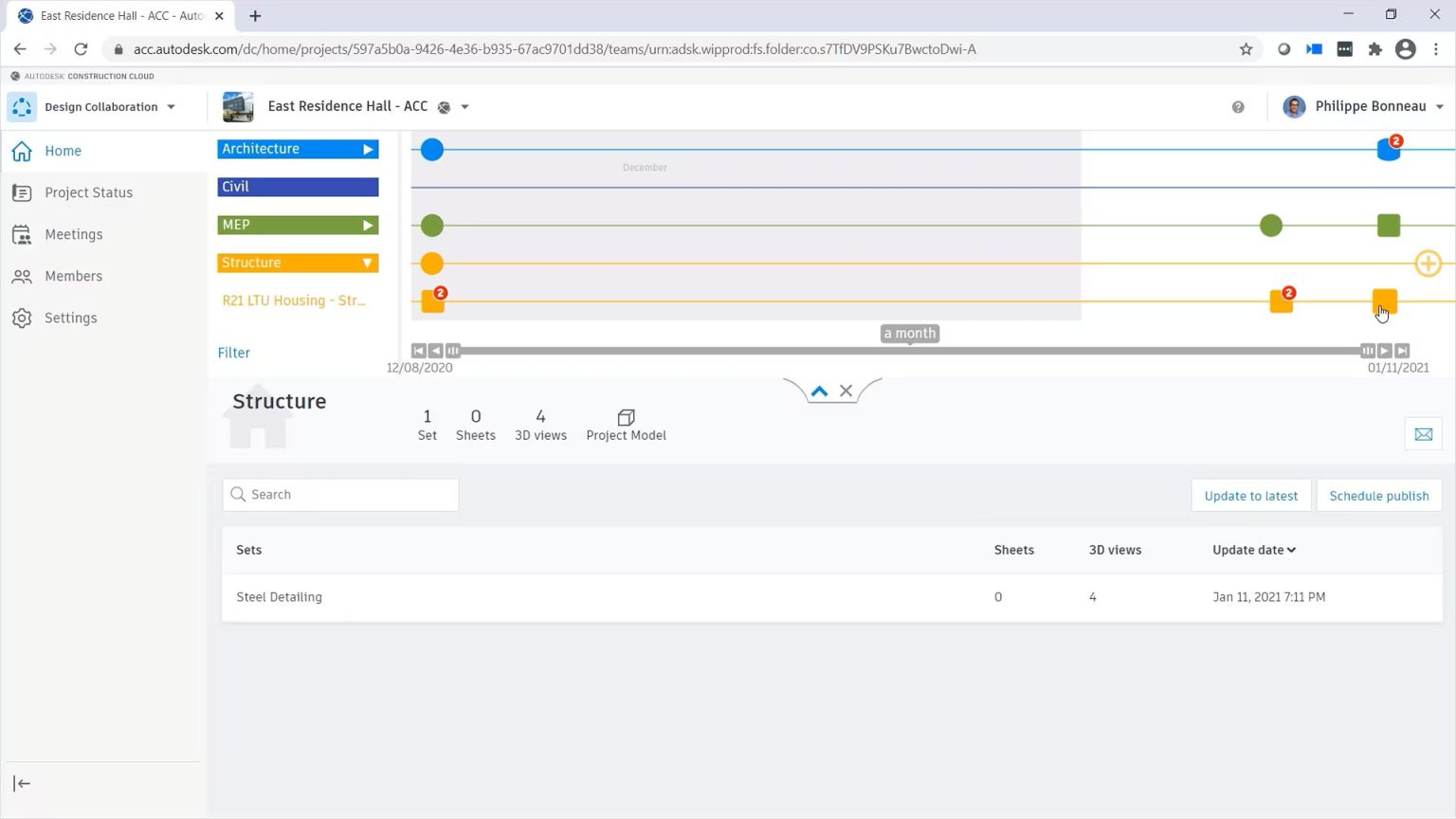
Project Timeline Visualization
Yes
Yes
Valuable Project Insights
Yes
Yes

Detailed Feature Analysis and Comparison

  • Cloud-based Document Management

BC offers a comprehensive cloud-based document management system, enabling teams to centralise project data and access documents from any location. This feature ensures that all team members are working with the latest information.

On the other hand, BCP enhances document management by adding real-time collaboration capabilities. Users can work on shared documents simultaneously, facilitating quicker issue resolution and more dynamic project updates.

  • Automated Clash Detection

Both platforms feature automated clash detection, essential for identifying design conflicts before construction begins.

BC allows users to run clash detection scans and generate reports to highlight conflicts, crucial for maintaining project timelines and budgets, whereas BCP not only includes clash detection but also supports real-time collaboration on clashes. Users can view and address issues as they arise, speeding up decision-making and minimising rework.

  • Advanced Analytics

Advanced analytics tools are available in both BC and BCP, offering valuable insights into project performance and the impact of changes. BC provides comprehensive analytics dashboards that allow users to track project progress and manage resource allocation effectively. These dashboards enable teams to generate detailed reports, helping them assess the effects of changes across various disciplines. Building on this foundation, BCP enhances the analytics experience with real-time data visualisation. This capability allows teams to identify trends and address issues as they emerge, ensuring timely interventions and more informed decision-making.

  • Design Review and Coordination

Design review and coordination are crucial for aligning all stakeholders on project goals. BC features intuitive markup tools that enable users to annotate designs and track issues seamlessly. Design reviews can be conducted via a web browser, simplifying the feedback collection process and making it accessible to all team members. On the other hand, BCP takes design review to the next level by adding real-time capabilities. This enhancement allows multiple users to provide feedback simultaneously, significantly improving communication and efficiency throughout the review process.

  • Real-time Co-authoring

A standout feature of BCP is its real-time co-authoring capability, which sets it apart from BC, which requires users to check out files for edits, potentially causing delays. On the other hand, BCP allows multiple users to work on the same model simultaneously. Changes made by one user are instantly visible to others, facilitating seamless collaboration and reducing the time required for design iterations. This real-time co-authoring capability enhances teamwork and accelerates project timelines.

  • Collaboration for Specific Software

BCP offers specialised collaboration tools for various Autodesk software, making it highly suitable for complex projects. For instance, it includes cloud worksharing for Revit models, which facilitates seamless collaboration among architects and engineers. Additionally, it enhances collaboration on site designs and grading plans for civil engineering teams using Civil 3D. For industrial projects, it supports real-time collaboration on piping and instrumentation diagrams with Plant 3D. In contrast, BC lacks these specialised tools, making it less suitable for teams that rely heavily on these specific applications.

  • Robust Access Controls

Both BC and BCP provide robust access controls to protect sensitive project data. BC allows administrators to set user permissions, controlling who can view, edit, and share project information. BCP builds on these access control features by adding the ability to manage permissions in real time. This ensures that data security is maintained during collaborative sessions, allowing teams to work confidently without compromising sensitive information.

  • Sandboxed Coordination Spaces

Sandboxed coordination spaces are a feature available in both platforms, enabling teams to explore design options without affecting the main project. BC supports the creation of isolated environments for testing changes, which is particularly useful for evaluating different design scenarios. Enhancing this capability, BCP allows for real-time collaboration within sandboxed spaces. This feature enables teams to discuss and resolve issues while exploring various design alternatives, fostering innovation and improving overall project outcomes.

  • Project Timeline Visualization

Effective project management requires clear visualisation of project timelines and milestones. BIM Collaborate includes tools such as Gantt charts and milestone tracking to help teams understand deadlines and dependencies. BIM Collaborate Pro offers these same visualisation tools but with the added benefit of real-time updates based on collaborative inputs. This ensures that all team members are aware of changes as they occur, promoting better coordination and timely adjustments to project schedules.

  • Valuable Project Insights

Both platforms provide valuable insights into project performance, helping teams identify trends and make informed decisions. BIM Collaborate offers analytics tools that track common issues and assess project performance over time. In contrast, BIM Collaborate Pro provides enhanced insights with real-time data visualisation. This capability makes it easier to spot potential problems and opportunities for improvement, allowing teams to proactively address issues and optimise project outcomes.

When to Use BIM Collaborate?

BC is ideal for:

  • Small to Medium-Sized Projects: Suitable for teams that do not need extensive real-time collaboration features.
  • Document Management Focus: Projects prioritising document management and design coordination.
  • Budget Constraints: Organisations seeking a cost-effective solution.
 

When to Use BIM Collaborate Pro?

BCP is best for:

  • Large Teams and Complex Projects: Ideal for teams needing real-time collaboration and coordination across multiple disciplines.
  • Integrated Workflows: Projects involving Autodesk software applications like Revit, Civil 3D, and Plant 3D.
  • Remote Collaboration: Organisations with distributed teams needing real-time co-authoring capabilities.

Integration with Other Autodesk Tools

Both BIM Collaborate and BIM Collaborate Pro integrate with other Autodesk tools:

  • Autodesk Revit: Both support Revit, with Pro offering advanced cloud work sharing.
  • Autodesk Civil 3D: Pro facilitates effective collaboration on site designs.
  • Autodesk Plant 3D: Pro supports industrial design collaboration.
  • Autodesk Navisworks: Both can be used with Navisworks for project visualisation and coordination.
 

Make the Right Choice for Your BIM Needs

Both BC and BCP play vital roles in enhancing collaboration within the AEC industry. While BC offers a strong foundation for document management and design coordination, BCP enhances the experience with real-time co-authoring and specialised tools for Autodesk applications.

When selecting between the two, consider your project size, team structure, and specific collaboration needs. Understanding the differences and capabilities of each platform will enable teams to make informed decisions, leading to more efficient project execution and better outcomes.

Embracing a cloud-based BIM solution is a step towards modernising your project workflows and enhancing collaboration throughout all phases of construction.

Contact Us

Contact us to find out how we can help your business. Fill out the form below, by live chat, phone or email.

P: 1800 490 514 |  E: info@designconsulting.com.au

Connected Design

Design Consulting Autodesk Gold Partner
about design consulting Moving at the Speed of Business

VIEW MORE

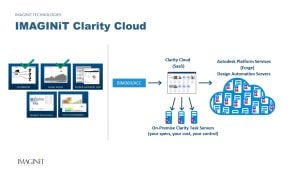
Powerful Revit Automation in Clarity 2025

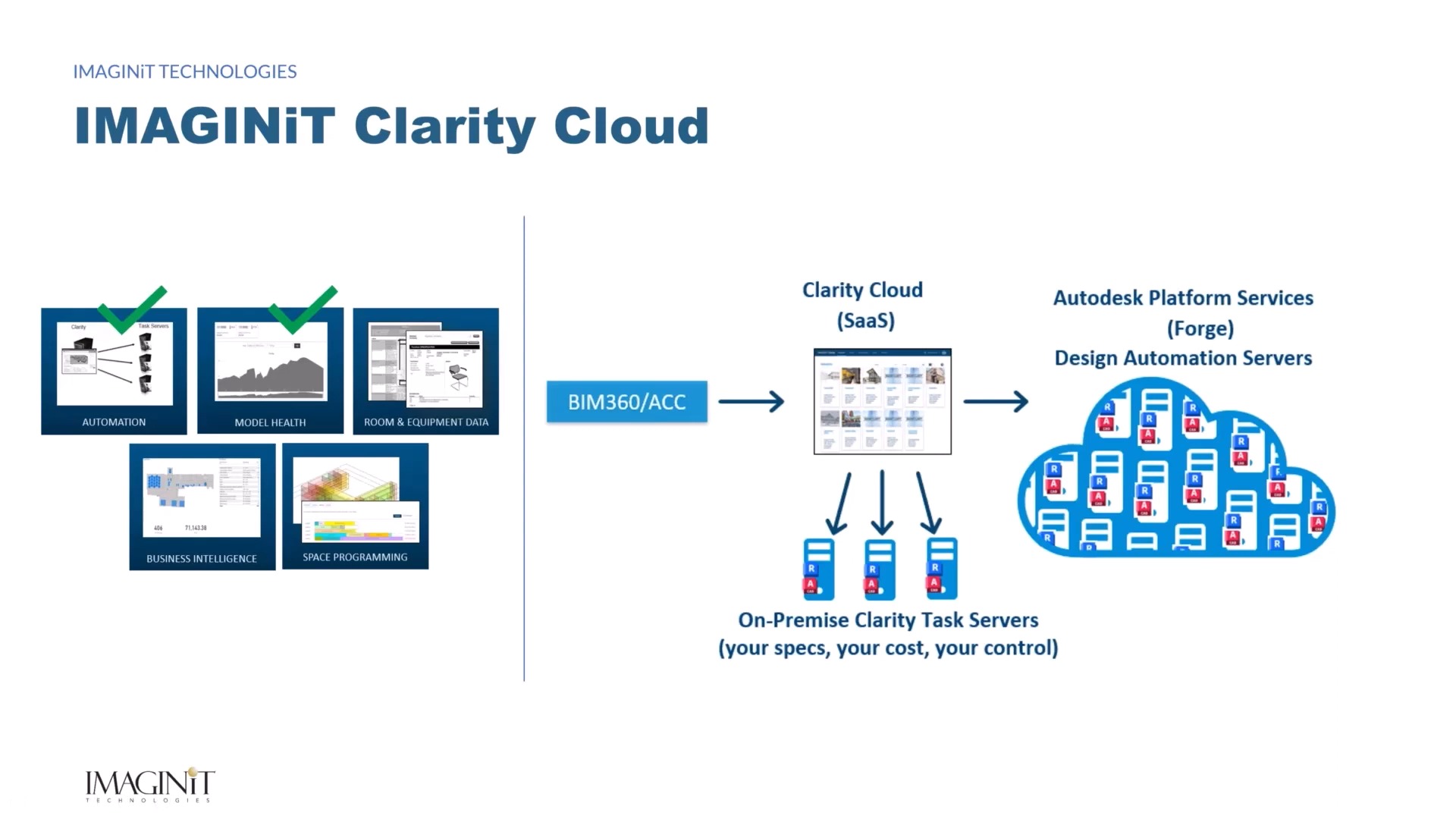
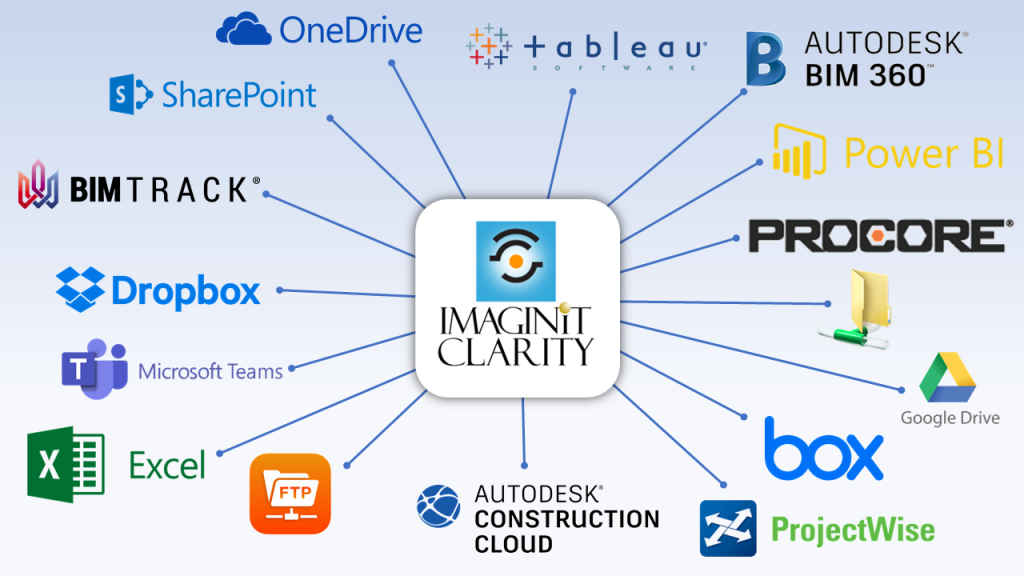
IMAGINiT Clarity integrate between BIM platfiorms and clouds systems and file management locally

Powerful Revit Automation in Clarity 2024

IMAGINiT Clarity integrate between BIM platfiorms and clouds systems and file management locally

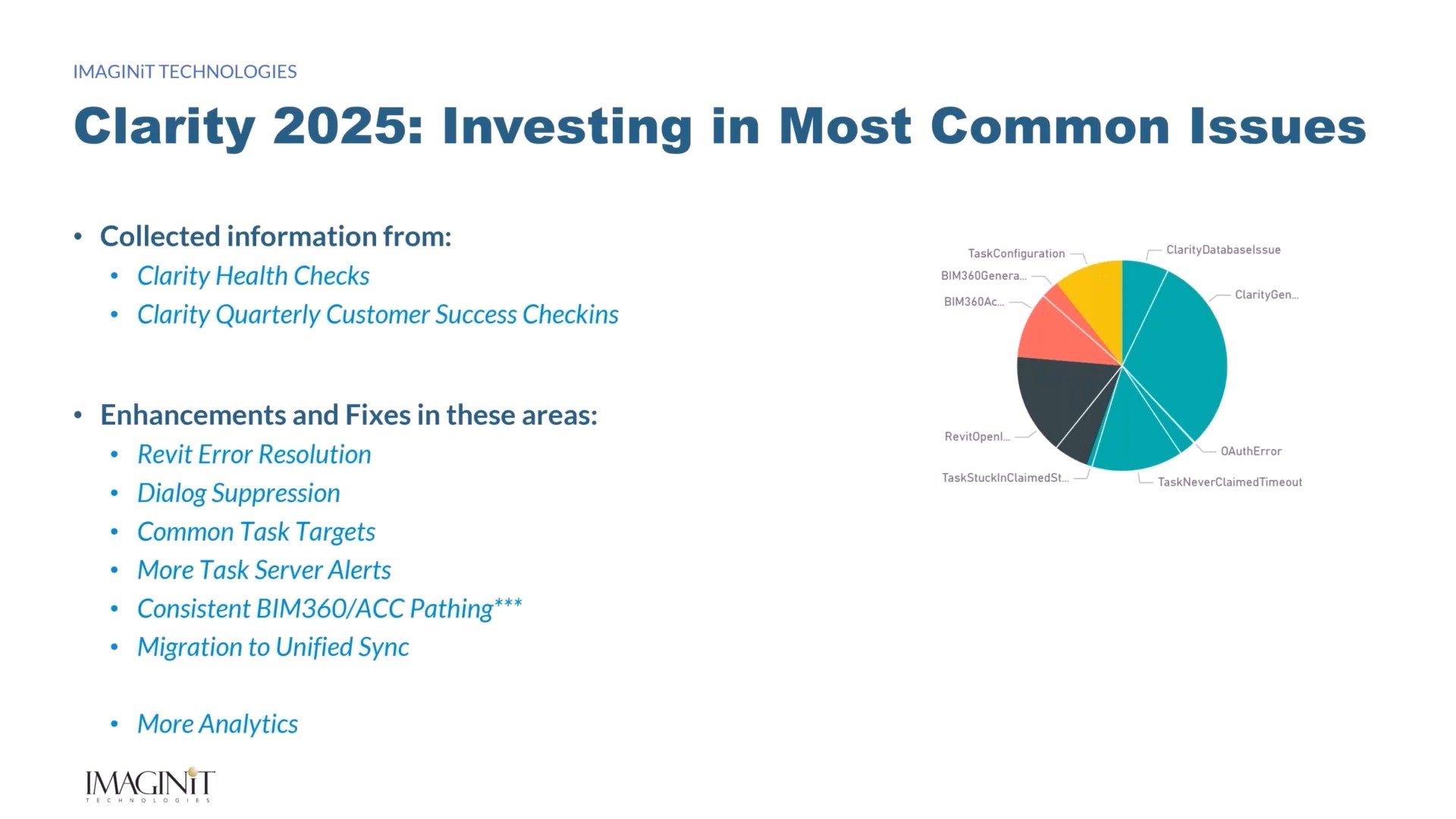
IMAGINiT Technologies has unveiled IMAGINiT Clarity 2024, introducing a host of novel features and streamlined task automation processes to significantly cut down on time spent dealing with manual, low-value tasks.

This enhancement offers heightened workflow efficiencies and improved task dependability, user-friendliness, and integration. As a result, BIM Coordinators gain a more substantial capacity to automate processes across projects, potentially leading to savings of over 200 hours per project annually.

Bill Zavadil, President and Chief Operating Officer at IMAGINiT Technologies, remarked, “Irrespective of whether it’s a startup or a top-tier architectural firm in the Engineering News Record Top 100, our focus has consistently been on translating customer insights garnered from webinars, implementations, and support inquiries into features that effectively tackle the most prevalent challenges.

Our Clarity suite of solutions enhances productivity by liberating time through the automation of manual, time-intensive tasks and the streamlining of administrative procedures. This affords teams the time to collaborate on higher-value design tasks. This is exemplified by the fact that Clarity’s suite of tools has recently surpassed a cumulative saving of 2 million project hours across our customer base since its initial launch in 2012.”

IMAGINiT Clarity 2024 is fully compatible with Autodesk Revit® 2024 and offers comprehensive support for versions of Autodesk Revit and Autodesk Revit Server dating back to 2020, with limited assistance available for Autodesk Revit 2019. Clarity 2024 brings fresh innovations to AEC firms, their BIM Coordinators, as well as their partners and clients, aiming to enhance workflows and heighten team efficiencies. Among the standout features are:

Metadata Enhancement

Clarity 2024 now bolsters metadata support for both Autodesk Construction Cloud and Autodesk BIM 360. Novel time-saving capabilities encompass web-based triggers that automatically initiate tasks upon specific changes within Autodesk Construction Cloud and Autodesk BIM 360 projects. Clarity further facilitates the effortless publication of existing Revit metadata into Autodesk Construction Cloud and BIM 360, seamlessly integrating all available metadata into the model.

For firms adopting ISO 19650 principles for building information management, Clarity facilitates the integration of the latest workflows by leveraging file metadata, ensuring team members employ documents as intended.

Powerful Automation for Revit with IMAGINiT Clarity 2024 Web-based triggers run tasks when a paramter is modified in the file, such as revit

Enhanced Unified Sync

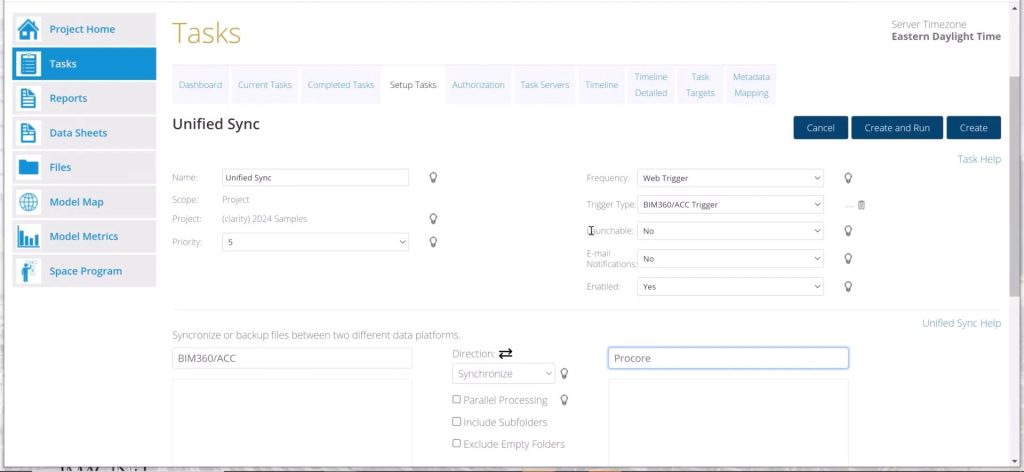
Clarity 2024 introduces an array of features that enhance the Unified Sync process across teams and external partners.The innovative Unified Sync Task centralises the file synchronization procedure, replacing multiple steps and tools with a unified, consistent dropdown menu that harmonizes data across platforms. This simplifies and accelerates the process by eliminating the necessity for diverse tools or interim data storage during synchronisation across platforms.

Unified Sync Task now offers support for Box, Dropbox, Google Drive, and Egnyte, augmenting the already extensive list of supported tools, including Autodesk Construction Cloud, Autodesk BIM360, Network Folder, ProjectWise, Procore, Microsoft Teams, OneDrive, and SharePoint.

In response to customer feedback, the Folder Name Mapping feature enables seamless synchronisation or backup of folders between cloud services, even when teams employ distinct folder structures. Users simply document the differences through an intuitive wizard, and Clarity subsequently ensures accurate mapping moving forward.

Further Integration Enhancements

Teams utilising Autodesk Desktop Connector version 16 are limited to 40 active projects per machine. However, Clarity 2024 now continually assesses the task queue that requires processing and automatically and dynamically activates or deactivates projects to accommodate the processing of all necessary tasks each day.

Operating around the clock, Clarity cycles through projects, guaranteeing that the maximum of 40 projects per machine is never exceeded, all while seamlessly managing tasks on each server to fulfill all required tasks.

Visit the IMAGINiT Clarity here or click here to visit IMAGINiT Technologies’ Clarity Page.

Get in Touch

DC is an authorised Autodesk Reseller providing products and services for the Architecture, Engineering, Construction, Infrastructure and Manufacturing Sectors.

Feel free to contact us on 1800 490 514, info@designconsulting.com.au, by live chat or fill out the form below.

Contact Form Demo

Design Consulting Logo

VIEW MORE

Autodesk Docs vs Build: Which is a Better Choice?

Autodesk Docs vs Build
Autodesk Construction Cloud

Autodesk Vs Build

Autodesk Docs and Autodesk Build, which includes all the features of Docs, are two cloud-based software solutions part of the Autodesk Construction Cloud that help construction teams manage their projects. Both platforms offer a variety of features for document management, collaboration, and communication. However, there are some key differences between the two platforms that may make one a better fit for your specific needs.

Autodesk Docs

Autodesk Docs is a document management platform that provides a central location for storing, sharing, and collaborating on project documents. It offers a variety of features for organizing and searching documents, as well as for tracking changes and versions. Autodesk Docs also integrates with other Autodesk products, such as BIM 360 and Revit.

Autodesk Build

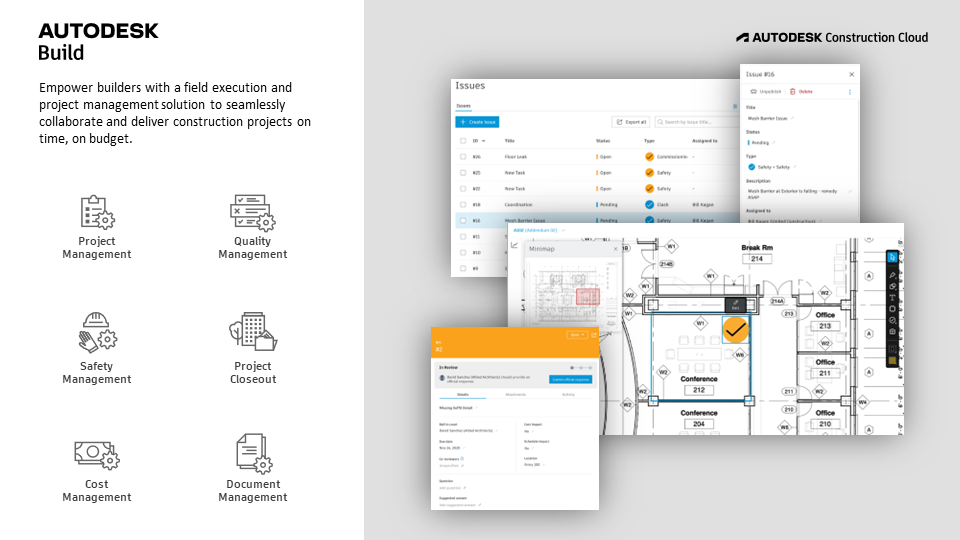
Autodesk Build is a project management platform that is specifically designed for the construction industry. It offers a variety of features for managing project schedules, costs, and resources. Autodesk Build also integrates with Autodesk Docs, so you can easily access and share project documents.

Compare Autodesk Docs Vs Build

Feature Autodesk Docs Autodesk Build
Document management Yes Yes
Collaboration Yes Yes
Communication Yes Yes
Project scheduling No Yes
Cost management No Yes
Resource management No Yes
Integration with Autodesk products Yes Yes
Mobile app Yes Yes
Autodesk build Autodesk Construction Cloud. Autodesk construction cloud centralised bid management. Autodesk BIM 360 vs Construction Cloud. Autodesk construction cloud design build plan operate Autodesk BIM 360 vs Construction Cloud. bim 360 vs acc, acc vs bim360, acc vs bim 360. Autodesk Construction Cloud vs BIM 360

Autodesk Vs Build – RFI’s

  • Docs: RFIs can be created and tracked in Docs, but they are not as tightly integrated with the rest of the platform as they are in Build.
  • Build: RFIs are a core feature of Build, and they are tightly integrated with the project schedule and budget. This makes it easy to track the status of RFIs and to ensure that they are resolved in a timely manner.

Autodesk Vs Build –

Issue Tracking

  • Docs: Issue tracking is not a core feature of Docs, but it can be enabled through a third-party integration.
  • Build: Issue tracking is a core feature of Build, and it is tightly integrated with the rest of the platform. This makes it easy to track the status of issues and to ensure that they are resolved in a timely manner.

Autodesk Build Features

Quality Management

Autodesk Build offers a variety of features for managing quality. You can create and track quality checklists, which are used to ensure that tasks are completed correctly. You can also create and track quality reports, which are used to identify and track quality issues.

Safety Management

Autodesk Build also offers a variety of features for managing safety. You can create and track safety checklists, which are used to ensure that work areas are safe. You can also create and track safety reports, which are used to identify and track safety issues.

Project Closeout

Autodesk Build offers a variety of features for managing project closeout. You can create and track closeout checklists, which are used to ensure that all project tasks are completed. You can also create and track closeout reports, which are used to document the project’s completion.

Cost Management

Autodesk Build also offers a variety of features for managing cost. You can create and track budgets, track expenses, and generate reports on project costs. You can also create and track change orders, which are used to modify the project scope or budget.

Here are some additional benefits of using Autodesk Build for quality management, safety management, project closeout, and cost management:

  • Increased visibility: Autodesk Build provides a central location for storing all project information, which makes it easy to track progress and identify potential problems.
  • Improved collaboration: Autodesk Build makes it easy for team members to collaborate on projects, even if they are not in the same location.
  • Automated workflows: Autodesk Build automates many of the tasks involved in quality management, safety management, project closeout, and cost management, which frees up team members to focus on other aspects of the project.
  • Real-time data: Autodesk Build provides real-time data on project progress, which allows team members to make informed decisions and take corrective action as needed.

Which platform is right for you?

The best platform for you will depend on your specific needs. If you are looking for a comprehensive document management platform, then Autodesk Docs is a good option. If you are looking for a project management platform with features for scheduling, costs, and resources, then Autodesk Build is a good option.

Autodesk Docs and Autodesk Build are both powerful platforms that can help you manage your construction projects. The best platform for you will depend on your specific needs. If you are not sure which platform is right for you, then I recommend contacting an Autodesk representative for more information.

Download the free eBook: 5 Ways Project Management Technology Helps Construction Owners Stay on Budget and on Time.

5 Ways Project Management Technology Helps Construction Owners Stay on Budget and on Time
ACS Whitepaper

VIEW MORE

Advance Steel Automation: How to Save Time and Improve Accuracy

Advance Steel structural steel fabrication, design and detailing software. Advance Steel Training fundamentals course
advance steel extension for revi Moving at the Speed of Business

Advance Steel Automation: How to Save Time and Improve Accuracy

Advance Steel is a powerful CAD software program that can be used to automate the design and detailing of steel structures. By automating repetitive tasks, Advance Steel can help engineers save time and improve accuracy.

Parametric Connection Library

The parametric connection library in Advance Steel is a powerful tool that can be used to automate the design of steel connections. The library contains a wide variety of connections, which can be customized to meet the specific requirements of a project.

Using the parametric connection library can save engineers a significant amount of time. Instead of manually creating each connection, engineers can simply select the desired connection from the library and modify it as needed.

Autodesk Advance Steel steel. Advance Steel to Revit fabrication workflows, Advance Steel automation

Porta Building

The porta building tool in Advance Steel is a powerful tool that can be used to automate the design of prefabricated steel buildings. The tool includes a variety of features that allow engineers to quickly and easily create porta buildings, including:

  • A library of prefabricated components
  • A wizard that guides engineers through the design process
  • The ability to create custom components
Autodesk Revit and Advance Steel for structural design and fabrication can be synched together

Folded Plate and Stairs

Another way Advance Steel automation is demonstrated is the folded plate and stairs tools which are powerful tools that can be used to automate the design of folded plate structures and stairs. The tools include a variety of features that allow engineers to quickly and easily create folded plate structures and stairs, including:

  • A library of prefabricated components
  • A wizard that guides engineers through the design process
  • The ability to create custom components
Advance Steel sheet metal and folded plate

Ladders and Rail Tools

The ladders and rail tools in Advance Steel are powerful tools that can be used to automate the design of ladders and rails. The tools include a variety of features that allow engineers to quickly and easily create ladders and rails, including:

  • A library of prefabricated components
  • A wizard that guides engineers through the design process
  • The ability to create custom components

Revision Control

Revision control is a system for tracking changes to a design. Advance Steel includes a built-in revision control system that allows engineers to track changes to drawings, parts, and assemblies.

This Advance Steel automation can be helpful for ensuring that the correct version of a design is always used. Additionally, revision control can be used to track the history of a design, which can be helpful for troubleshooting problems.

Generating DXF and NC1 Files

DXF files are a common file format for exchanging CAD data. Advance Steel automation can be used to generate DXF files for a variety of purposes, such as sharing designs with other CAD users or exporting designs to manufacturing software.

Generating DXF files with Advance Steel is a quick and easy process. Simply select the desired objects and click on the “Export to DXF” button.

NC1 files are used to control the operation of CNC machines. Advance Steel can be used to generate NC1 files for a variety of steel fabrication processes, such as punching, cutting, and bending.

This can save a significant amount of time, as it eliminates the need to manually create NC1 files. Additionally, Advance Steel can ensure that the NC1 files are accurate and up-to-date.

Dynamo

Dynamo is a visual programming environment that can be used to automate tasks in Advance Steel. With Dynamo, engineers can create custom scripts that can be used to automate repetitive tasks, such as generating drawings, creating NC1 files, and generating DXF files.

Dynamo can be a powerful tool for automating tasks in Advance Steel. However, it is important to note that Dynamo is a complex tool and requires some programming knowledge to use.

Synchronisation with Revit

Advance Steel can be synchronised with Revit, which allows engineers to automate the import and export of structural BIM and fabrication models. This can save engineers a significant amount of time, as they can avoid having to manually create and update models in both software programs.

The synchronisation between Advance Steel and Revit is bi-directional, which means that changes made in one software program are automatically reflected in the other software program. This ensures that both models are always up-to-date.

Advance Steel to Revit Moving at the Speed of Business

Advance Steel Features

Advance Steel has all the tools of AutoCAD plus: 

  • Document Manager System with revision control to check status, update drawings, track changes and rename drawing numbers.
  • Structural steel beam and column library
  • Folded plate and flatten tools
  • Building Grid
  • Cut Beams and Plates
  • Place bolts, anchors, holes, and shear studs
  • Create welds
  • Connection library – Create, copy and customise
  • Stairs, handrails and cage ladder tools
  • Portable/Gable Frame Tool
  • Mono-pitch Frame tool
  • Bracing tool
  • Purlins, joist and truss tools
  • Cladding tools
  • Clash Check
  • Camera views
  • Automated drawings (requires configuration)
  • 2D Shop Drawings (GA and part)
  • Parts List
  • Export to DXF
  • Export NC1 (CNC Machine)
Advance Steel connections Moving at the Speed of Business

Drawing Webinar Series

Get access to the 4 day drawing webinar series:

  • Understand Drawing style data structure
  • Learn how to create new drawing styles or reuse existing
  • Learn how the modeling impacts drawing output
  • Learn general drawing style concepts for dimensioning
  • Learn basic and advanced filtering for dimensioning objects


Advance Steel Webinar Series

What's new in Advance Steel 2023

Advance Steel features 1 Moving at the Speed of Business
Advance Steel Features 2 Moving at the Speed of Business

Get in Touch

DC is an authorised Autodesk Reseller providing products and services for the Architecture, Engineering, Construction, Infrastructure and Manufacturing Sectors.

Feel free to contact us on 1800 490 514, info@designconsulting.com.au, by live chat or fill out the form below.

Contact Form Demo

VIEW MORE

Revolutionizing Design Efficiency: Exploring the Power of Automation in Revit

Autodesk Revit Software for BIM, Archiecture, MEP and Structural design, analysis, detailing and documentation

Revolutionising Design Efficiency: Exploring the Power of Automation in Revit

A group of architects collaborating on a digital design project using Revit software, showcasing the power of automation in streamlining architectural workflows.

Revit, developed by Autodesk, has revolutionized the architectural design industry with its robust capabilities and user-friendly interface. From generating accurate 3D models to facilitating collaboration, Revit empowers designers to create remarkable architectural projects efficiently. However, one of its most notable features lies in its ability to automate design processes, enabling users to save time and effort. Let’s explore some of the various ways Revit users can leverage automation to transform their design workflows.

Automating Repetitive Tasks

Repetitive tasks can eat up a significant amount of a designer’s time. Thankfully, Revit provides tools and features that allow users to automate these repetitive tasks. By creating custom families, utilising parametric modeling, and employing the power of Dynamo (a visual programming tool integrated with Revit), designers can automate processes such as placing doors, windows, or other elements, as well as generating floor plans, sections, and elevations. This automation not only saves time but also reduces the chances of errors.

Rule-Based Design

Revit allows designers to define specific rules and constraints for their projects. By utilizing tools such as Design Options and Conditional Statements, users can automate the design process based on predefined criteria. For example, designers can create rules that automatically adjust room sizes based on occupancy or generate different design alternatives based on specified parameters. This rule-based design approach empowers designers to explore numerous design iterations quickly and efficiently.

Schedule and Quantity Automation

Generating schedules and quantities is an essential part of the design process, but it can be time-consuming. Revit simplifies this task by automating the process of extracting data from the model and generating schedules and quantity takeoffs. By utilizing Revit’s powerful scheduling capabilities and integrating Revit with tools like Excel, designers can automate the generation of material schedules, cost estimates, and other project documentation. This automation ensures accuracy, consistency, and significant time savings.

Parametric Design and Generative Design

Revit’s parametric design capabilities allow designers to create relationships between different elements in the model. By utilising parameters, formulas, and nested families, designers can automate the design process by defining flexible relationships and enabling quick design iterations. Furthermore, with the integration of generative design tools, such as Autodesk’s Project Refinery, Revit users can explore automated design alternatives driven by artificial intelligence algorithms. This automation revolutionises the design process, helping designers discover innovative solutions and optimise project outcomes.

Dynamo

Dynamo is a visual programming extension for Revit that allows designers to automate complex design tasks. With its node-based interface, users can create custom workflows and automate repetitive processes in Revit. By dragging and connecting nodes, designers can generate parametric designs, manipulate geometry, extract data, and perform various other tasks with ease. Dynamo’s flexibility and versatility make it a powerful tool for automating design processes in Revit.

PyRevit

PyRevit is a powerful automation tool that extends the functionality of Revit by allowing users to create custom commands, automate repetitive tasks, and streamline workflows. Built on the Python programming language, PyRevit provides designers with the flexibility to write scripts, create macros, and develop plugins that automate complex design processes. Whether it’s automating the creation of views, managing project data, or performing model analysis, PyRevit enhances productivity and empowers designers to achieve more in less time.

Exploring the Power of Automation in Revit with Autodesk Platform Services (Forge)

Autodesk Platform Services, also known as Forge, is a cloud-based development platform that provides designers with a set of APIs and services to build custom applications and automate workflows in Revit. With Forge, designers can integrate their Revit models with other applications, extract data, perform advanced analysis, and automate repetitive tasks. Whether it’s creating a custom dashboard, integrating with external databases, or developing AI-powered automation, Forge offers a powerful suite of tools to extend the capabilities of Revit and drive design efficiency.

Automating Revit with IMAGINiT Clarity

IMAGINiT Clarity is a powerful software solution designed to automate and optimize Revit workflows. By integrating with Revit, Clarity enables designers to streamline processes, enhance collaboration, and increase productivity. With Clarity, you can automate tasks such as model checking, sheet creation, PDF generation, and more. By eliminating manual efforts and reducing errors, IMAGINiT Clarity empowers Revit users to focus on design and innovation while maximising efficiency.

Ready to Automate?

Contact us on 1800 490 514, info@designconsulting.com.au or fill out the contact us form below.

Design Automation

VIEW MORE

Connected Structural Design with the Autodesk Architecture Engineering and Construction Collection

Learn how the Autodesk AEC Collection connects Advance Steel, Revit and other programs for structural design, analysis and fabrication
Design Consulting Architecture Engineering and Construction Collection logo Moving at the Speed of Business

Connected Structural Design with the Autodesk Architecture Engineering and Construction Collection

The construction industry has seen a significant transformation in recent years with the adoption of new technologies and software. Structural engineering is no exception, as it plays a crucial role in the success of any construction project. Autodesk Architecture, Engineering, and Construction (AEC) Industry Collection is a suite of powerful software tools that enable structural engineers and fabricators to streamline their workflows and improve collaboration.

In this blog post, we will explore how Advance Steel, a software tool within the AEC Industry Collection, works with other applications such as Revit, Autodesk Docs, Robot Structural Analysis, Navisworks, and more to create a connected design process. We will also discuss the benefits of this approach for structural engineers and fabricators on construction projects.

How Does Advance Steel Work With Other Applications in the Collection?

With the AEC Industry Collection, structural engineers can create detailed designs, collaborate with architects and other stakeholders, and analyse their designs for efficiency and safety. Fabricators can use the software to create shop drawings and CNC files, and contractors can use it to manage construction projects and ensure that they stay on schedule and on budget.

Advance Steel is a software tool within the AEC Industry Collection that provides 3D modeling and detailing for steel structures. It is designed to streamline the design and fabrication process for steel structures, making it easier for engineers and fabricators to collaborate and ensure accuracy.

Advance Steel can be used to create detailed steel models in 3D, including connections, plates, and bolts. It also provides tools for creating drawings, bills of materials, and NC files for fabrication. With Advance Steel, engineers and fabricators can ensure that their designs are accurate and meet industry standards.

How Advance Steel works with other applications in the AEC Industry Collection

One of the key benefits of the AEC Industry Collection is that it provides a connected design process. This means that engineers and fabricators can use multiple software tools in the collection to streamline their workflows and ensure accuracy.

Here are some of the ways that Advance Steel works with other applications in the AEC Industry Collection:

  1. Revit: Advance Steel can be used with Revit to create detailed steel models that include all of the necessary information for fabrication. Revit can also be used to create detailed architectural and MEP models, which can be linked to the steel model in Advance Steel for coordination.

  2. Autodesk Docs: Autodesk Docs is a cloud-based document management platform that can be used to store and share project information. With Autodesk Docs, engineers and fabricators can collaborate on design files, RFIs, submittals, and more.

  3. Robot Structural Analysis: Robot Structural Analysis is a software tool that can be used to analyse steel structures for safety and efficiency. With Robot Structural Analysis, engineers can perform finite element analysis (FEA) on their steel models to ensure that they meet industry standards.

  4. Navisworks: Navisworks is a software tool that can be used for project coordination and clash detection. With Navisworks, engineers can import steel models from Advance Steel and other software tools to check for clashes and ensure.

  5. Other Applications: The AEC Industry Collection includes a wide range of other software tools that can be used in conjunction with Advance Steel. For example, Fabrication CADmep can be used to create detailed ductwork and piping models that can be linked to the steel model in Advance Steel for coordination.


Benefits of Connected Design for Structural Engineers and Fabricators

The connected design process enabled by the AEC Industry Collection provides several benefits for structural engineers and fabricators. Here are some of the key advantages:

  1. Improved Collaboration: By using multiple software tools in the AEC Industry Collection, engineers and fabricators can collaborate more effectively. They can share design files, coordinate different aspects of the project, and ensure that everyone is working from the same information.

  2. Streamlined Workflows: The connected design process also streamlines workflows by reducing the need for manual data entry and rework. Engineers and fabricators can move seamlessly between different software tools, and the data is automatically synchronised.

  3. Increased Accuracy: By using software tools like Advance Steel, engineers and fabricators can ensure that their designs are accurate and meet industry standards. They can also perform analysis and simulations to ensure that the structure is safe and efficient.

  4. Faster Time-to-Market: The connected design process enables faster time-to-market by reducing the time needed for design and fabrication. This can help construction companies stay on schedule and avoid delays.

  5. Cost Savings: Finally, the connected design process can also lead to cost savings by reducing the need for rework and minimising errors. This can help construction companies stay on budget and avoid costly mistakes.

Ready to Get Connected?

Save up to 20% on Autodesk Software and Services

How Dynamo is Revolutionising Structural Design with Advance Steel and Revit

Dynamo is a visual programming tool that is transforming the way structural engineers and designers work. When combined with software tools like Advance Steel and Revit, it offers several benefits that can help streamline workflows and increase efficiency. In this article, we’ll explore the benefits of using Dynamo with Advance Steel and Revit for structural design.

  1. Automating Repetitive Tasks

One of the main benefits of using Dynamo with Advance Steel and Revit is the ability to automate repetitive tasks. For example, Dynamo can be used to automatically create connections between steel elements in Advance Steel based on predefined rules. This can save time and reduce errors, allowing engineers and designers to focus on more complex tasks.

  1. Enhanced Collaboration

Dynamo also improves collaboration between different teams involved in the structural design process. By using a visual programming language, designers and engineers can easily share scripts and workflows with other team members, regardless of their level of technical expertise. This helps to improve communication and ensures that everyone is working from the same information.

  1. Increased Accuracy and Quality

Using Dynamo with Advance Steel and Revit can help improve the accuracy and quality of structural designs. For example, Dynamo can be used to automatically calculate loads and reactions for a structure, or to optimize the size and shape of steel members. This can lead to more efficient and cost-effective designs, as well as better structural performance.

  1. Streamlined Workflows

Dynamo helps to streamline workflows by eliminating the need for manual data entry and reducing the potential for errors. By automating repetitive tasks and using a visual programming language, engineers and designers can move seamlessly between different software tools, saving time and reducing the potential for delays and mistakes.

  1. Improved Visualization

Finally, using Dynamo with Advance Steel and Revit can improve visualisation of the design. With Dynamo, engineers and designers can create complex geometry and parametric models, allowing for greater flexibility and better visualisation of the structure. This can help identify potential issues and make design decisions more effectively.

FeaturesAutoCADAdvance SteelRevit
2D DraftingComprehensive set of 2D drafting tools, including line, circle, polyline, arc, and text toolsLimited 2D drafting tools, including line, circle, and text toolsLimited 2D drafting tools, including line, circle, and text tools
3D ModelingOffers basic 3D modeling tools, including extrude, revolve, and loft toolsOffers more advanced 3D modeling tools, including parametric modeling tools and the ability to automatically generate steel elementsOffers advanced 3D modeling tools, including parametric modeling tools and the ability to create complex geometry
Steel ModelingLimited steel modeling tools, including the ability to create steel elements manuallyOffers more advanced steel modeling tools, including the ability to automatically generate steel elements and parametric modeling toolsOffers basic steel modeling tools, including the ability to create steel elements manually
Steel DetailingLimited steel detailing tools, including the ability to create drawings of steel elementsOffers more advanced steel detailing tools, including the ability to automatically create part drawings, DXF and NC1 files, and CNC data exportOffers basic steel detailing tools, including the ability to create drawings of steel elements
Connection DesignNo connection design toolsOffers comprehensive connection design tools, including the ability to create and analyze connectionsOffers limited connection design tools, including the ability to create basic connections
Structural AnalysisNo structural analysis toolsOffers more advanced structural analysis tools, including the ability to analyze and optimize steel structuresOffers basic structural analysis tools, including the ability to analyze and check steel structures
FabricationNo fabrication toolsOffers comprehensive fabrication tools, including the ability to create shop drawings, CNC data export, and automatic creation of bills of materialsLimited fabrication tools, including the ability to create shop drawings and bills of materials
CollaborationOffers basic collaboration tools, including the ability to share drawings and collaborate on designOffers more advanced collaboration tools, including the ability to connect to Dynamo and synchronize with Revit modelsOffers advanced collaboration tools, including the ability to connect to Dynamo and synchronize with Advance Steel models

AutoCAD offers a comprehensive set of 2D drafting tools, including line, circle, polyline, arc, and text tools. It also offers basic 3D modeling tools, such as extrude, revolve, and loft tools. However, it has limited steel modeling and detailing tools, connection design, structural analysis, and fabrication tools.

Advance Steel offers more advanced steel modeling and detailing tools than AutoCAD. It can automatically generate steel elements, create part drawings, DXF and NC1 files, and export CNC data. It also has comprehensive connection design and fabrication tools. Advance Steel is specifically designed for steel design and fabrication, making it a powerful tool for structural engineers and steel fabricators.

Revit offers advanced 3D modeling tools and basic steel modeling and detailing tools. It can connect to Dynamo and synchronise with Advance Steel models, which makes it an excellent tool for collaboration with architects and other stakeholders in the building design process.

In summary, the choice between AutoCAD, Advance Steel, and Revit depends on the specific needs of the project and the users. AutoCAD is a general-purpose drafting tool, while Advance Steel is specifically designed for steel design and fabrication, and Revit is an excellent tool for collaboration and building design coordination.


Analysing Structural Designs: Advance Steel Vs Revit Vs Robot Structural Analysis

FeatureAdvance SteelRevitRobot Structural Analysis
Finite Element AnalysisYesYesYes
Static AnalysisYesYesYes
Dynamic AnalysisYesNoYes
Buckling AnalysisYesNoYes
Nonlinear AnalysisYesNoYes
Eigenvalue AnalysisYesNoYes
Response Spectrum AnalysisYesNoYes
Pushover AnalysisYesNoYes
Design OptimizationYesNoYes
Steel Connections AnalysisYesNoYes
Concrete AnalysisNoYesYes
Wood AnalysisNoYesYes
Masonry AnalysisNoYesYes
Design Code CompatibilityMultipleMultipleMultiple
Integration with Other ToolsRevit, DynamoNavisworksRevit, Navisworks

Overall, all three software products offer FEA capabilities for structural analysis, including static analysis and finite element analysis. However, Robot Structural Analysis offers more advanced analysis options such as dynamic analysis, buckling analysis, nonlinear analysis, eigenvalue analysis, response spectrum analysis, and pushover analysis. Advance Steel offers the ability to analyze steel connections, while Revit offers analysis options for concrete, wood, and masonry.

In terms of design code compatibility, all three software products support multiple design codes. Additionally, Revit and Robot Structural Analysis can integrate with Navisworks for clash detection and coordination, while Advance Steel and Revit can connect with Dynamo for automation and optimization of structural designs.


Structural Design Collaboration with the AEC Collection

Structural steel design collaboration is a critical aspect of any construction project. Autodesk AEC Collection offers several collaboration tools, including Navisworks and Autodesk Docs, that can help structural engineers collaborate effectively throughout the design and construction process.

Navisworks is a project review and coordination tool that allows engineers and designers to combine models and data from various sources, including Advance Steel and Revit. Navisworks can help identify and resolve potential design conflicts, allowing for more efficient construction planning and reducing the risk of costly errors during construction.

Autodesk Docs is a cloud-based collaboration tool that allows team members to share and access project information, documents, and models from anywhere and on any device. With Autodesk Docs, structural engineers can collaborate in real-time with other team members, including architects, contractors, and owners. The tool can also help track changes, versioning, and approval workflows, ensuring that all team members are working on the latest version of the project documents.

Connected Structural Design

The Autodesk Architecture Engineering and Construction Collection is a powerful suite of software programs that can help architects create better designs and collaborate more effectively with other professionals in the construction industry. By using programs such as Revit, Navisworks, and Docs, architects can create digital models of buildings and share them with other stakeholders, streamlining the design process and reducing errors. By collaborating with MEP/HVAC, Structural and Civil engineers and designers, architects can ensure that their designs are not only visually appealing but also practical and functional, resulting in better-performing buildings that meet safety and regulatory requirements.

Ready to get your Design Connected?

Discover how Autodesk Architecture Engineering and Construction Collection can streamline your workflow, increase productivity, and optimise your design process. 

Get up to 20% Off Software or Services!

Contact us to find out how much money you can save on software, training or other services. Fill out the form below, by live chat, phone or email.

P: 1800 490 514 |  E: info@designconsulting.com.au
Connected Design

The Autodesk Architecture, Engineering and Construction Collection streamlines design, analysis, and visualization for architecture, engineering, construction, infrastructure, and manufacturing industries. The suite of software programs improves efficiency, reduces errors and rework, and increases cost-effectiveness.

Connected Design with Architecture Engineering and Construction Collection

Click a link below to learn more about Connected Design using the Autodesk Product Design & Manufacturing Collection 


Fatal error: Allowed memory size of 268435456 bytes exhausted (tried to allocate 20480 bytes) in /var/www/designconsulting.com.au/wp-content/plugins/elementor/includes/base/controls-stack.php on line 2221

Fatal error: Allowed memory size of 268435456 bytes exhausted (tried to allocate 69632 bytes) in /var/www/designconsulting.com.au/wp-includes/class-wpdb.php on line 2351